Backup and disaster recovery appliance for virtual machines
Backs up virtual machines on VMware, Hyper-V, Proxmox VE and Linux KVM, copies them to a second location, keeps them ready to start on another server and brings them back within minutes when needed. All in one box, with its own operating system.
Incremental backupOnly changed blocks are read and written.
Immutable repositoryRansomware cannot delete or encrypt the backup.
Cross-platformRestore a VMware backup to Proxmox or Hyper-V.
ReplicationFail over within minutes to a copy that is ready and waiting.
Sysnet · signbackup.com.trProduct brochure · November 2026
Product summary
What is SignBackup?
SignBackup is a backup appliance that backs up the machines in a virtualized environment at image level. It is installed on a physical server or as a virtual machine; the operating system, the backup software and the web interface come as a single signed image. No separate Windows server, database or agent is needed.
Back up
Connects to the hypervisor, takes a snapshot of the machines and writes their disks to the repository. The first backup is full; the following ones contain only changed blocks.
Protect
Backups are encrypted, compressed and checksummed. An immutable repository does not allow any backup to be deleted before its period expires.
Restore
Restores an entire machine to a new or the original location, a single disk or individual files; converts to another platform when needed.
Copy
For the 3-2-1 rule, moves backups to a second repository, to SFTP, to S3-compatible storage or to a second SignBackup appliance at a remote site.
Stay ready
Replication keeps a powered-off copy of the machines up to date on the target hypervisor. When production fails, the replica is started.
Monitor
The dashboard, reports, task center, security score and email/SMS notifications tell you what is protected and what is not.
How it works
Add the hypervisor. On the Inventory page, add a vCenter, ESXi, Hyper-V or Proxmox VE connection; the machines are scanned.
Connect the repository. A local disk, NFS or SMB share becomes the primary repository.
Set up the job. In the wizard, choose the machines, repository, schedule and retention. The job runs on schedule automatically.
Restore. Pick the machine and restore point from the tree on the Restore page; the wizard guides you step by step.
Backup and restore
Fast backup, flexible recovery
The backup is taken from the hypervisor snapshot; the machine keeps running. Restore goes from an entire machine down to a single file.
Backup
Incremental backup: only changed blocks are read, using CBT on VMware and dirty bitmaps on Proxmox VE.
VMware read paths: HotAdd (the disk is attached to the appliance, the fastest), network export and a reader machine. The right path is chosen automatically.
Pre-check: if there is not enough space on the datastore for the snapshot or in the repository for the backup, the machine is skipped before any snapshot is taken and the reason is logged.
Scheduling: daily, weekly and monthly calendars; a backup window; job chains in which one job starts when another finishes.
Retention: number of restore points, days and GFS (weekly, monthly, quarterly, yearly). Old chains are merged with a synthetic full.
Compression and encryption: Compression, AES-256-GCM block encryption and a checksum on every block.
Restore
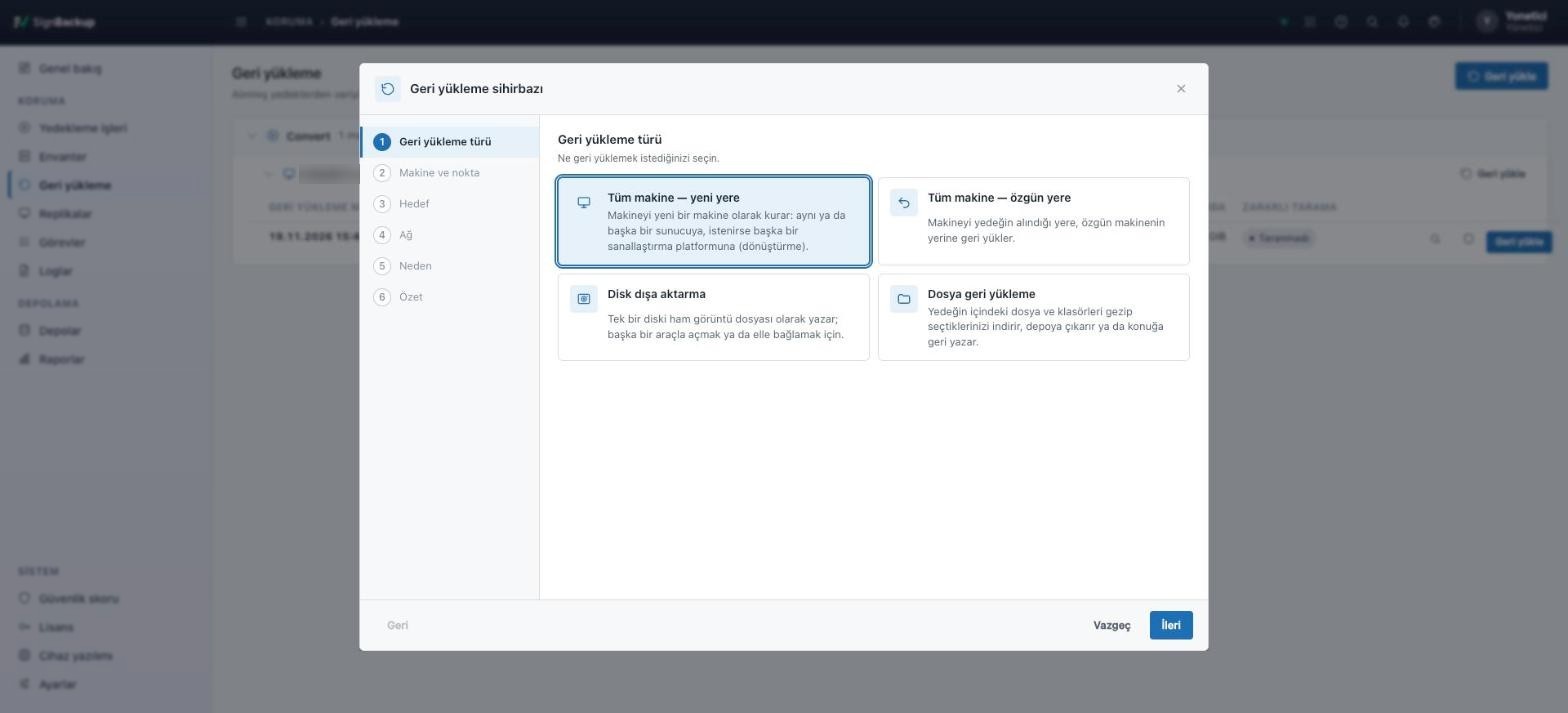
Entire machine — new location: to the same or another server, with a new name and network mapping.
Entire machine — original location: keeping or deleting the old one, or writing back only the changed blocks.
Cross-platform conversion: a backup from one platform is created as a new machine on another platform.
File restore: browse inside the backup; files are downloaded as a zip, extracted to a repository or written back to the guest machine.
Disk export: a single disk is written out as a raw image.
Integrity check: every block's checksum, the encryption and the content digest are verified; no data is changed.
Restore wizard: steps on the left, restore type on the right.
Copy and disaster recovery
The 3-2-1 rule and machines ready to go
One copy is not enough. SignBackup moves backups to a second location and, if you want, keeps machines ready to start on another server.
Backup copy
A copy job moves backups that have already been taken to a second repository; it does not touch the running machine or the production network. The copy has its own retention rule: you can keep 14 days in the main repository and 12 months of backups in the remote one.
Target
How
Second local repository
Another disk, NFS or SMB share attached to the appliance.
SFTP server
Encrypted over the internet or a slow link, without a VPN. A Linux server or NAS with SFTP enabled is enough on the other side.
S3-compatible storage
A bucket on a service such as AWS S3, MinIO, Wasabi or Ceph, over HTTPS.
Second SignBackup appliance
The appliance at the remote site writes the copy to its own repository; backups can be restored there directly.
The copy can be verified by reading it back on the target, does not overload the link thanks to bandwidth limits and a copy window, and an interrupted transfer resumes where it left off.
Replication
A replica is a powered-off copy of a machine on the target hypervisor (Proxmox VE, VMware ESXi / vCenter or Hyper-V). It is fed from backups already taken; the production machine is not touched a second time, and only changed blocks are written on each run.
Test failover: the replica is started on an isolated network, and all changes are discarded after testing.
Failover: when production fails, the replica is started from the current or an older restore point.
Undo / permanent failover: failover can be undone, or the replica becomes a permanent machine.
Two sites: from the copy received by a remote appliance, a replica can be kept on the hypervisor at the remote site.
Replicas page: the status of each replica, the number of restore points and failover operations.
Against ransomware
The backup itself is protected too
Attackers go after the backups first. SignBackup protects the backup in layers against deletion, encryption and unauthorized access.
Immutable backup
Every backup written to the repository cannot be changed or deleted for the set number of days, even if the administrator account is compromised. Emergency deletion is possible only with a specially authorized account, two-step verification and a waiting period. A clock safeguard prevents unlocking by moving the appliance clock forward.
Encryption
Blocks are encrypted with AES-256-GCM. If a backup password is set on the job, the backup can be opened only with that password or the offline recovery key; the password is never stored anywhere.
Malware scanning
Digests of the files in the backup are compared with the SignGuard file reputation list; this can run automatically after every backup or before a restore. The disk is not mounted anywhere.
Access security
Two-step verification (authenticator app or SMS), recovery codes, six roles, account lockout, password and session policy, SSH access restriction and an audit log of every operation.
Security score
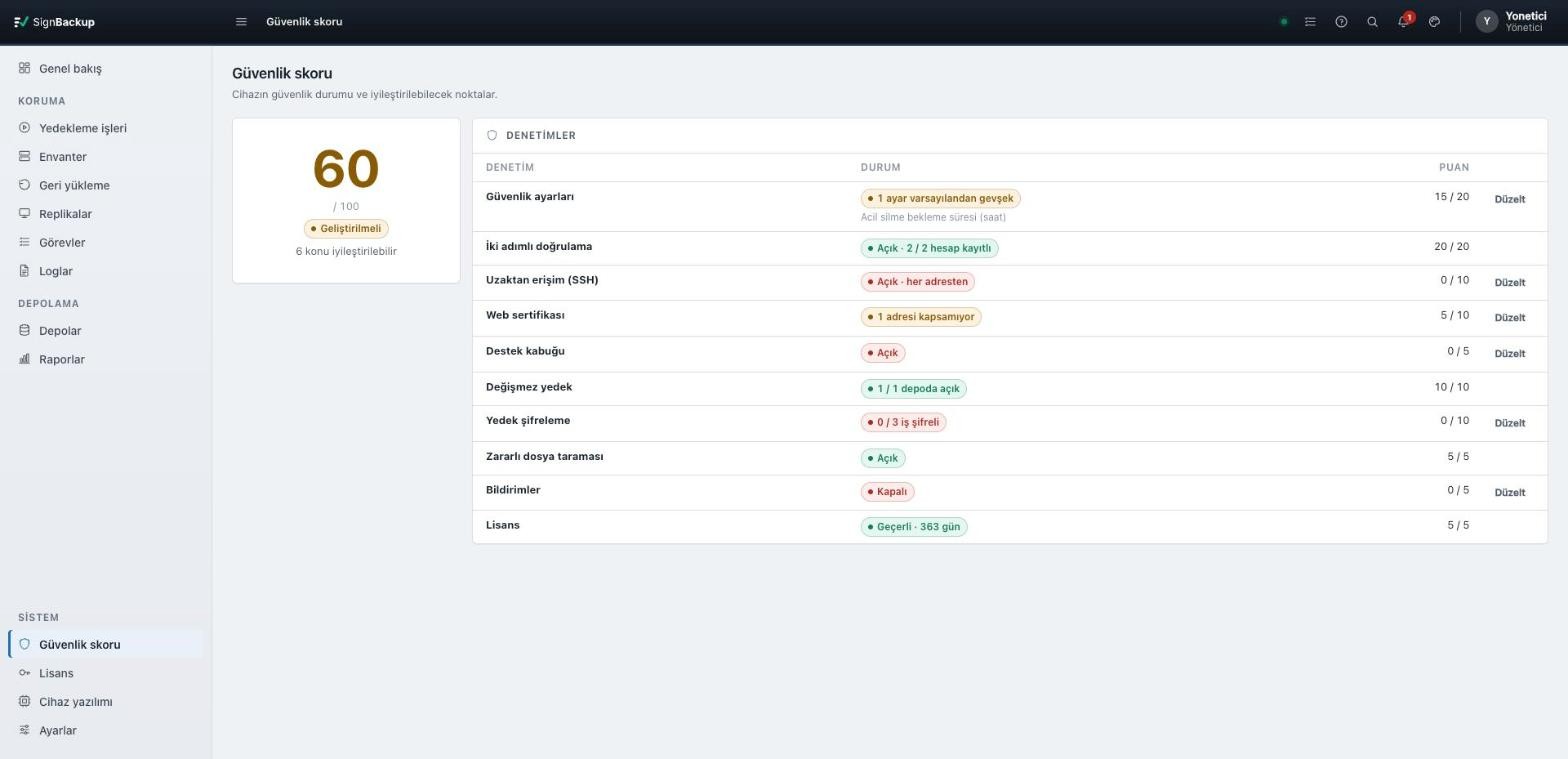
The appliance scores its own security posture from 0 to 100: relaxed settings, two-step verification, SSH, certificate, immutability, encryption, scanning and notifications are checked. Next to every missing item there is a button that takes you to the page that fixes it.
Security score: the status and points of each check.
Management and monitoring
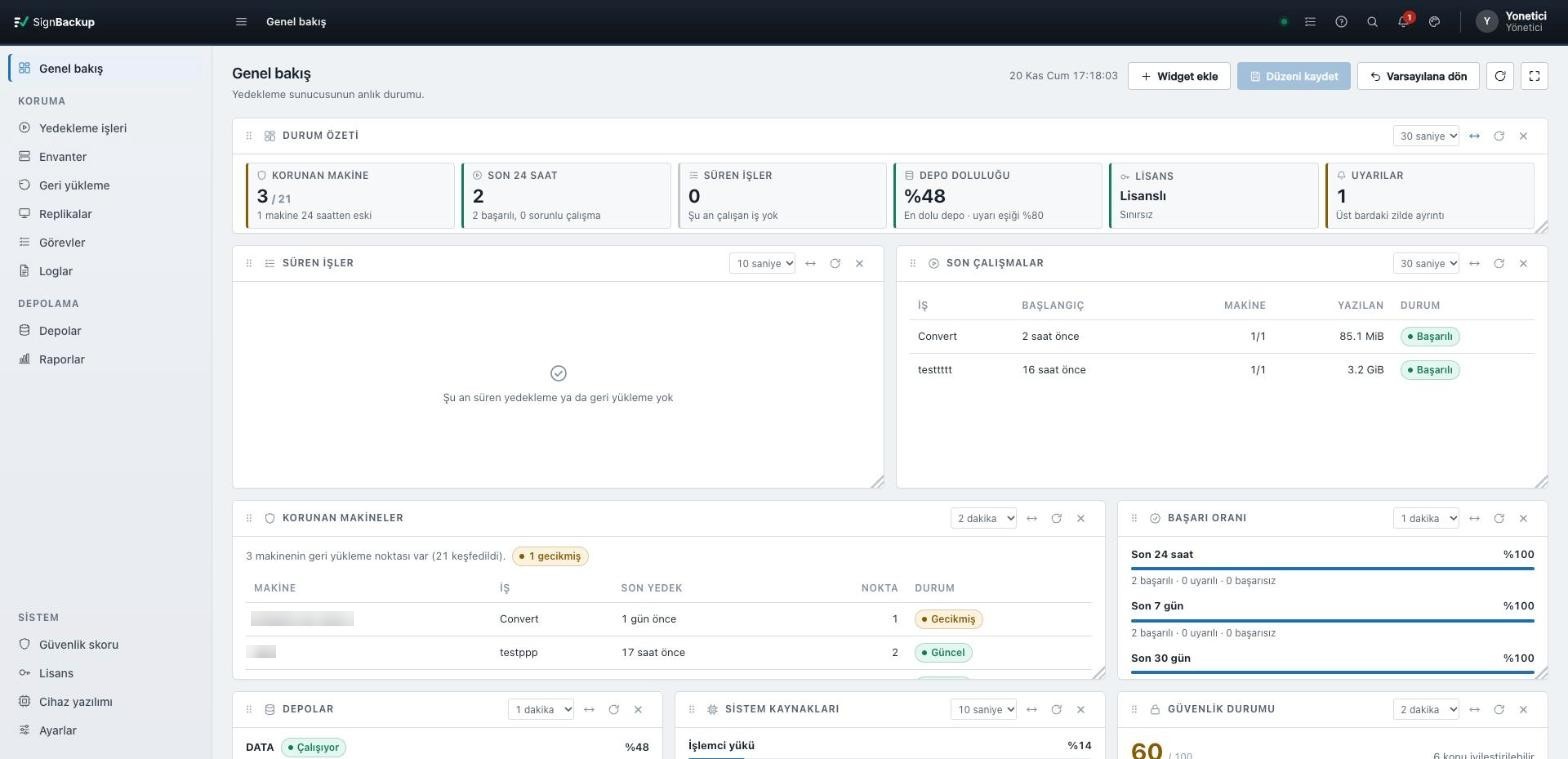
What is protected, at a glance
The web interface is available in Turkish and English, with detailed help on every page. All settings are gathered on a single Settings page.
Task center: a step-by-step log of every run, with warnings on separate lines.
Notifications: email (SMTP, OAuth2, relay) and SMS; recipient groups, per-event and per-job rules, daily summary.
Audit log: every operation is recorded and can be forwarded to a SIEM via syslog (CEF).
Appliance
A/B firmware: updates are written to the other partition; if the new version does not boot, the appliance automatically returns to the previous one.
Online or offline update: from the update server or with a signed file.
Offline license: installations without internet access are activated with a license file.
Console menu: when the web interface cannot be reached: network address, unlocking, SSH, certificate, restart and factory reset.
Web certificate: your own certificate or one generated by the appliance.
Licensing
Try it first, license it as you grow
A single license unlocks all advanced features; there are no separate packages. An unlicensed appliance backs up at most 5 virtual machines. Restore is always available, and existing backups are never deleted.
Feature
Unlicensed
Licensed
Virtual machines backed up
Up to 5
Unlimited
Scheduled and manual backup, incremental backup
Yes
Yes
Restore to the same platform, file restore
Yes
Yes
Copy to a second repository attached to the appliance
Yes
Yes
Copy to a remote target (SFTP, S3, second appliance)
—
Yes
Replication
—
Yes
Cross-platform conversion
—
Yes
Immutable backup, GFS retention
—
Yes
Two-step verification, SMS sign-in
—
Yes
Malware scanning (SignGuard)
—
Yes
Agents that back up physical machines are licensed separately: each agent requires its own license.
Technical specifications
Technical details at a glance
SignBackup is agentless: it talks to the hypervisor through its own interfaces and installs no software on the virtual machines.
Source platforms
VMware vSphere 6.0 and later (standalone ESXi host or vCenter), Microsoft Hyper-V (Windows Server), Proxmox VE (single server or cluster), Linux KVM
Backup type
Image-level, agentless; full + incremental, synthetic full merge
Repositories
Local disk, NFS, SMB, deduplication appliance profile; SFTP, S3-compatible storage or a second SignBackup appliance for remote copies
Data security
Compression, AES-256-GCM encryption, block checksums and SHA-256 content digest
Retention
Number of restore points, days, GFS; per-repository immutability period
Identity and access
Administrator, operator, restore-only, immutability officer, auditor and read-only roles; two-step verification with TOTP and SMS