Who did what, when, and with what result: the tamper-evident audit log.
- Menu path: Left menu › Protection › Logs (
/loglar) - Who uses it: Everyone can view
Purpose
The Logs page shows the appliance's audit log: who did what, when, and with what result. The log is read-only; records cannot be deleted or edited from the interface. Each record is chained with SHA-256 and includes the hash of the previous record.
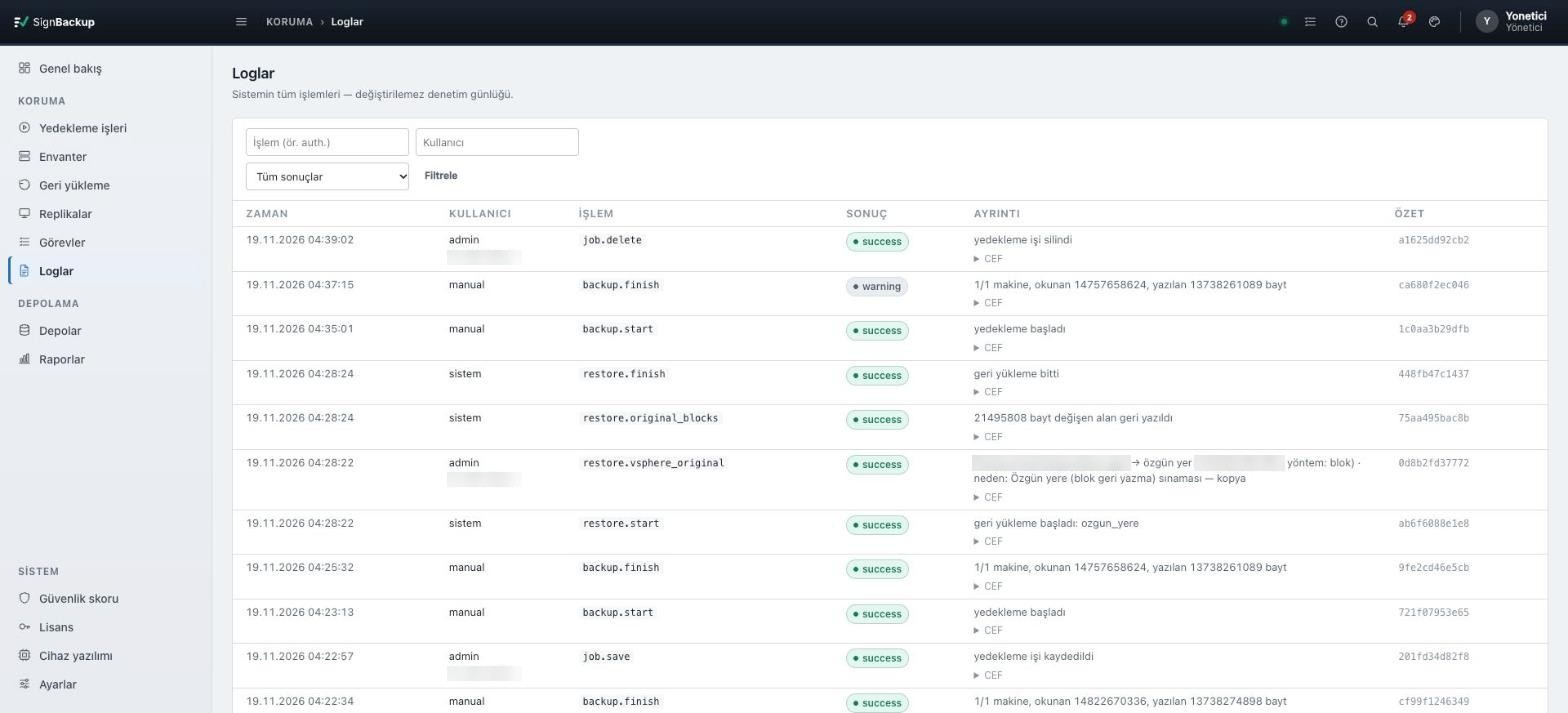
Step-by-step
- Open Logs from the left menu. Records are shown newest first, 100 records per page.
- Type a prefix in the Action box:
auth.returns all session events,restore.returns all restores. - Type part of a name in the User box (not case-sensitive).
- Choose Successful, Failed or Denied from the result list and click Filter. Clear removes the filters.
- To see the format in which an event is sent to the SIEM, expand the CEF line under Details.
- If there are multiple pages, use Previous / Next at the bottom to navigate.
Columns and sample action codes
| Column | Description |
|---|---|
| Time | day.month.year hour:minute:second. |
| User | User and IP; system for the appliance's own tasks; for backup runs, the trigger type (e.g. manual) is shown. |
| Action | Event code. |
| Result | Successful (success), Failed, Denied (unauthorized attempt); runs that finished with warnings appear as warning. |
| Details | Description of the event; CEF line. |
| Hash | The first 12 characters of the record's integrity hash. |
| Code | Event |
|---|---|
auth.login, auth.password_change | Sign-in and password change |
job.save, job.delete | Job save and deletion |
backup.start, backup.finish | Backup start and finish (bytes read/written) |
restore.start, restore.vsphere_original, restore.original_blocks, restore.finish | Restore to the original location and the changed areas written back |
storage.save | Repository save |
scan.finished | Malware scan result |
system.reboot, system.poweroff | Restart and shutdown (including from the console) |
Warnings
| Message | Meaning | What to do |
|---|---|---|
| WARNING: Audit chain broken at record #N — records may have been altered. | Each time the page is opened, it verifies the chain from start to end; a record has been modified, deleted or inserted. | Treat it as a security incident and contact Sysnet support. |
| Denied | An unauthorized attempt (e.g. an action the role does not permit, or a support shell password that could not be verified). | Investigate the user and the IP address. |
Related settings
| Setting | Location | Default |
|---|---|---|
| Audit log retention (days) | Settings › Audit and history | 365 (30–3650) |
| Syslog forwarding (CEF) | Settings › Logs | Off |
Syslog and retention in detail
Frequently asked questions
Can I turn off the audit log?
No. The audit log cannot be turned off and its records cannot be modified.
Does a factory reset delete the log?
No. Audit records are kept.
How are old records deleted?
Months whose retention period has expired are deleted as a whole from the start of the chain; the chain remains valid from the first remaining record. Records may be kept up to one month longer than the retention period.