Ten checks that summarize the appliance's security posture as a 0–100 score, with Fix links.
- Menu path: Left menu › System › Security score (
/guvenlik) - Who uses it: Administrator only
Purpose
The security score summarizes the appliance's security posture as a single score (0–100) and shows what can be improved. The same score also appears at the top of the Security status widget on the dashboard (Overview).
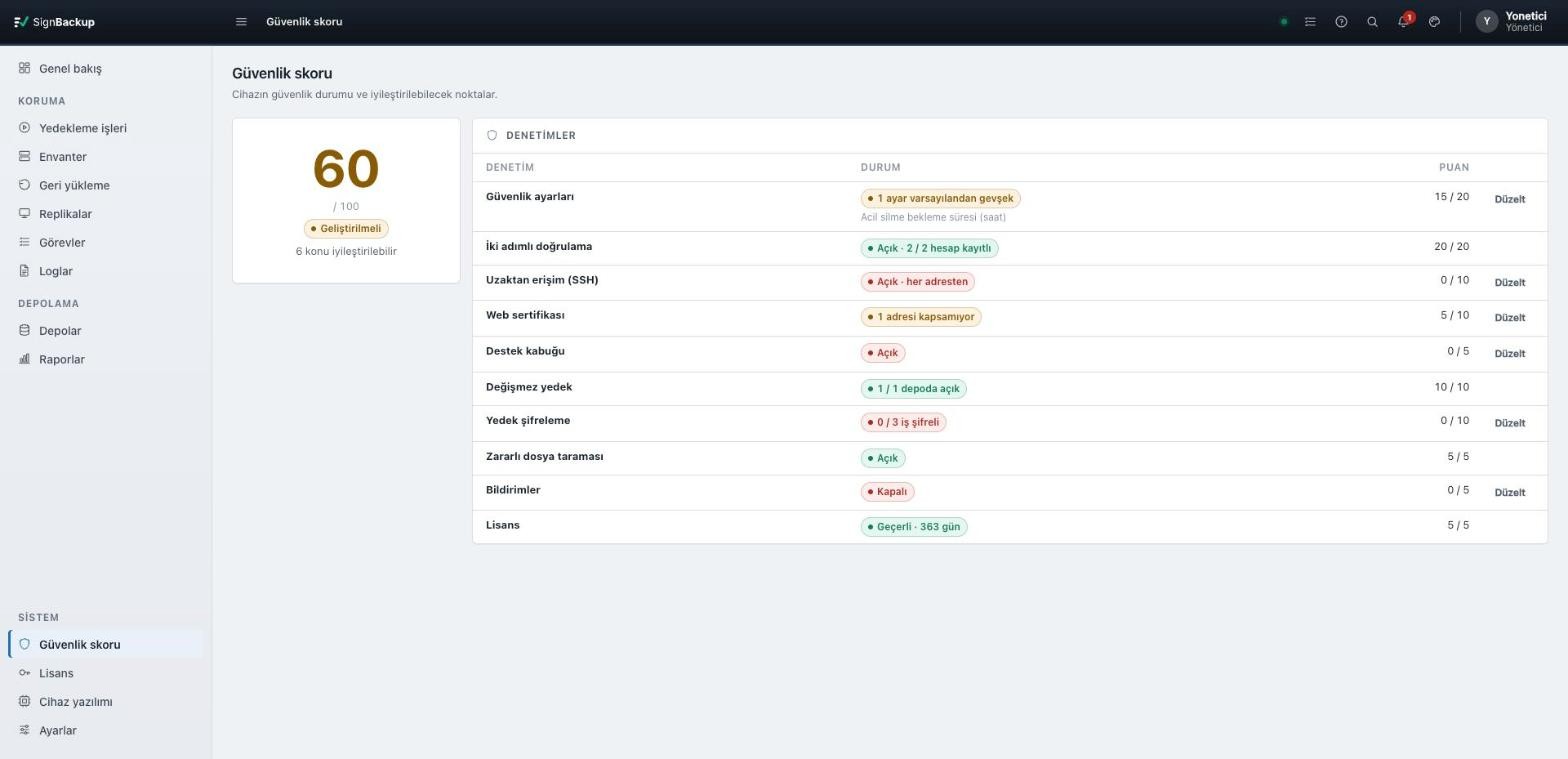
How the score is calculated
Each check has a weight; the score is the ratio of the points earned to the total weight.
| Score | Label |
|---|---|
| 85 and above | Good |
| 60–84 | Needs improvement |
| Below 60 | Weak |
A check that cannot be measured (e.g. a system service is not responding at the moment) is shown as Could not be measured and does not lower the score. A feature that requires a license is shown as License required on an unlicensed appliance and earns no points.
Checks
| Check | Weight | For full points |
|---|---|---|
| Security settings | 20 | No setting may be looser than its default. Each loosened setting deducts 5 points; their names are shown under the row. |
| Two-factor authentication | 20 | 10 points if the policy is on; the rest according to the share of enrolled accounts. |
| Remote access (SSH) | 10 | SSH off. 7 if it is open only to specific addresses, 0 if it is open to all addresses. |
| Web certificate | 10 | Valid, with more days to expiry than the warning threshold, and covering all of the appliance's addresses. |
| Support shell | 5 | Off. |
| Immutable backup | 10 | An immutability period is defined on all repositories; points according to the share of repositories with it on. |
| Backup encryption | 10 | All jobs are encrypted; points according to the share of encrypted jobs. |
| Malware scanning | 5 | On. |
| Notifications | 5 | On, with at least one event rule or subscription (Notifications (email and SMS)). |
| License | 5 | License is valid. |
Fixing
- Click Fix at the end of a row without full points; the page where that item is configured opens.
- Change the setting and save it.
- Refresh the Security score page; the score is updated.
Frequently asked questions
If the score is not 100, is the appliance insecure?
No. The score shows items that can be improved; for example, you may deliberately keep SSH open.
Why doesn't the score change on its own?
It is calculated when the page opens; refresh the page after a change.