Email servers, recipient groups, event rules, limits, daily summary, per-job rule and user subscriptions.
- Menu path: Settings › Notification and integration › Notifications · Email servers
- Who uses it: Settings: Administrator · subscriptions: each user for their own account
Purpose
Reports events on the appliance (backup failed, repository filling up, emergency deletion request…) by email and SMS. The product does not send anything to anyone on its own; you choose which event goes to whom and through which channel. There are two categories: Settings › Email servers (where messages are sent from) and Settings › Notifications (to whom, and when).
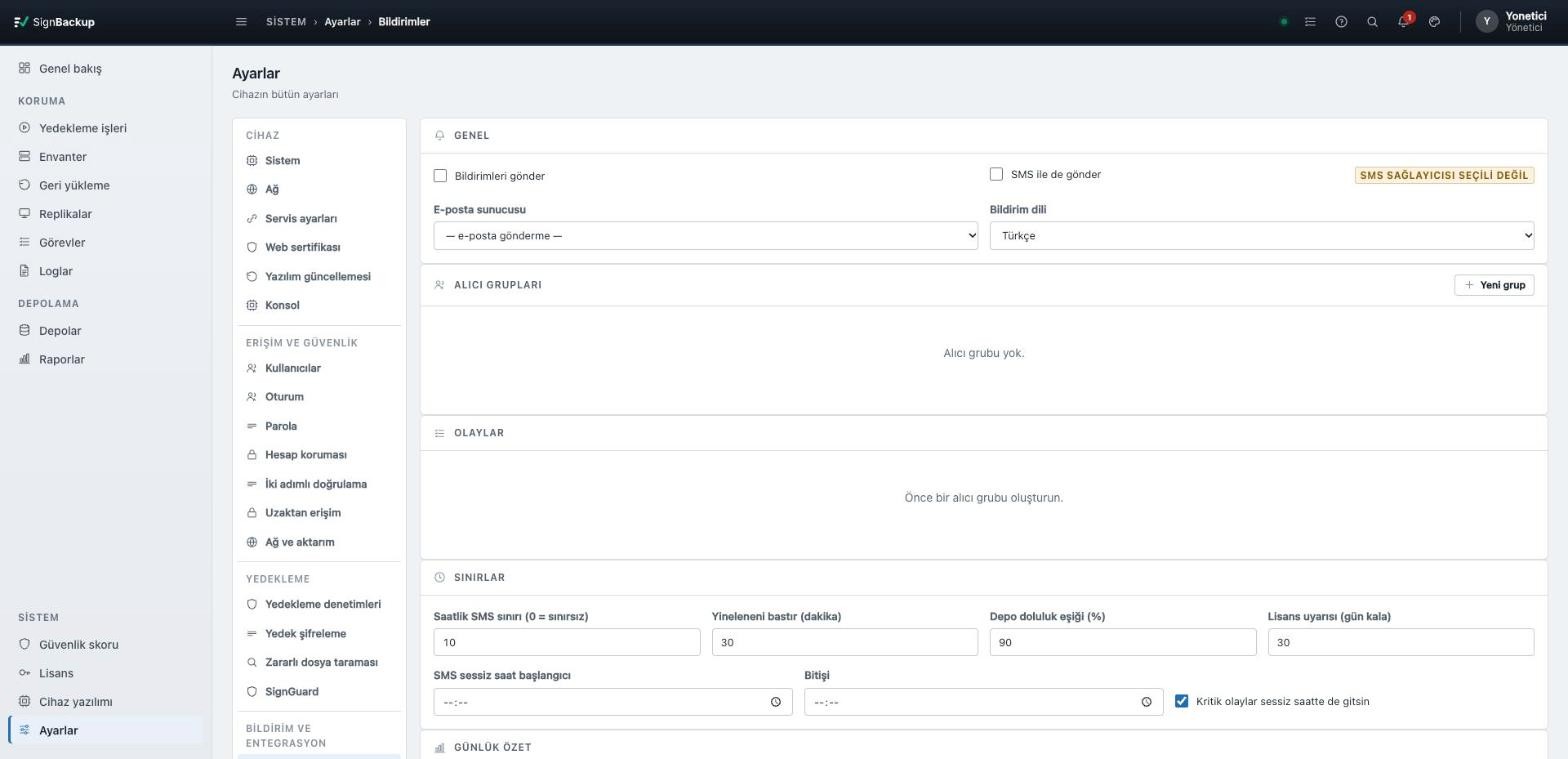
Step-by-step setup
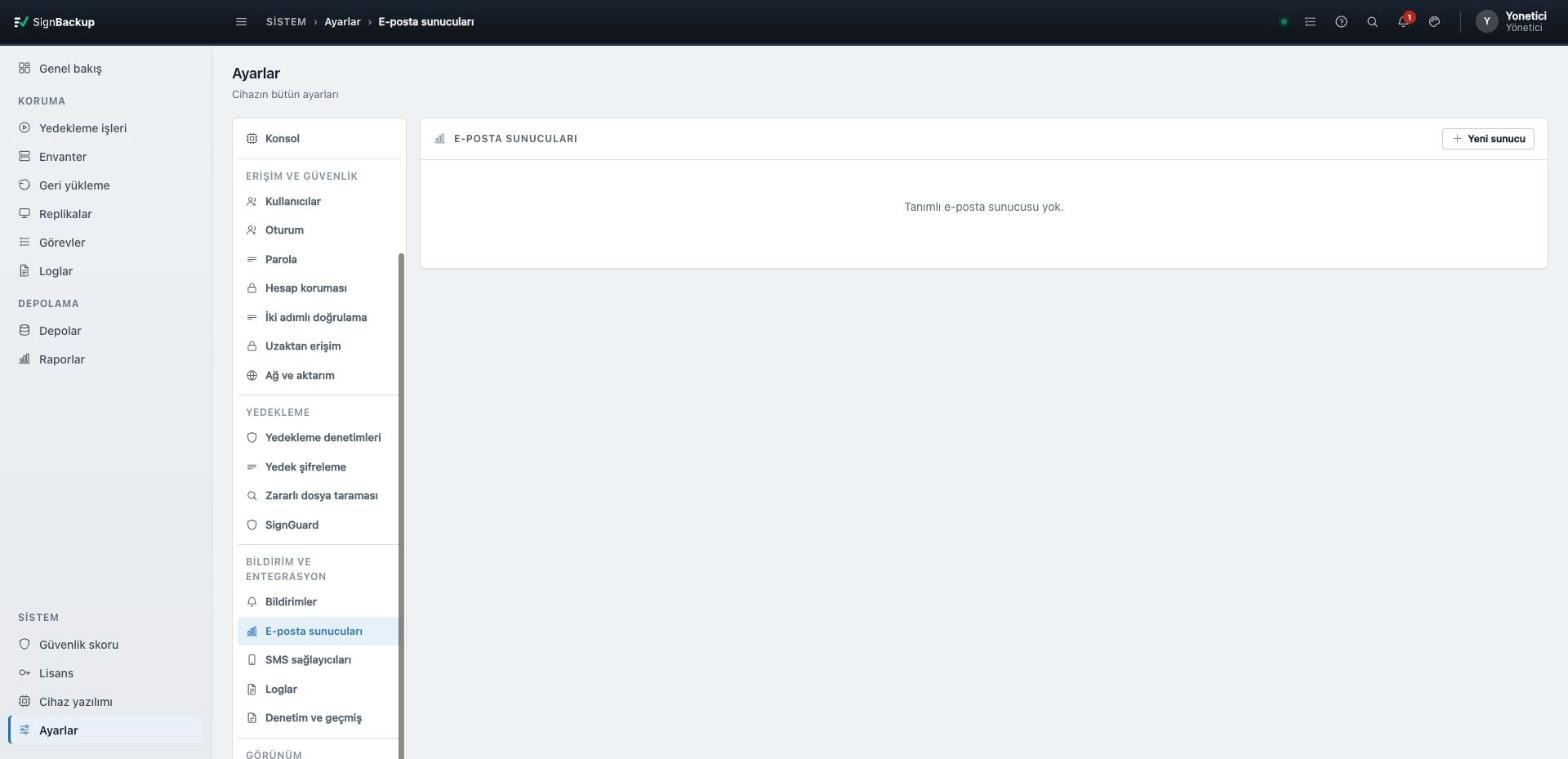
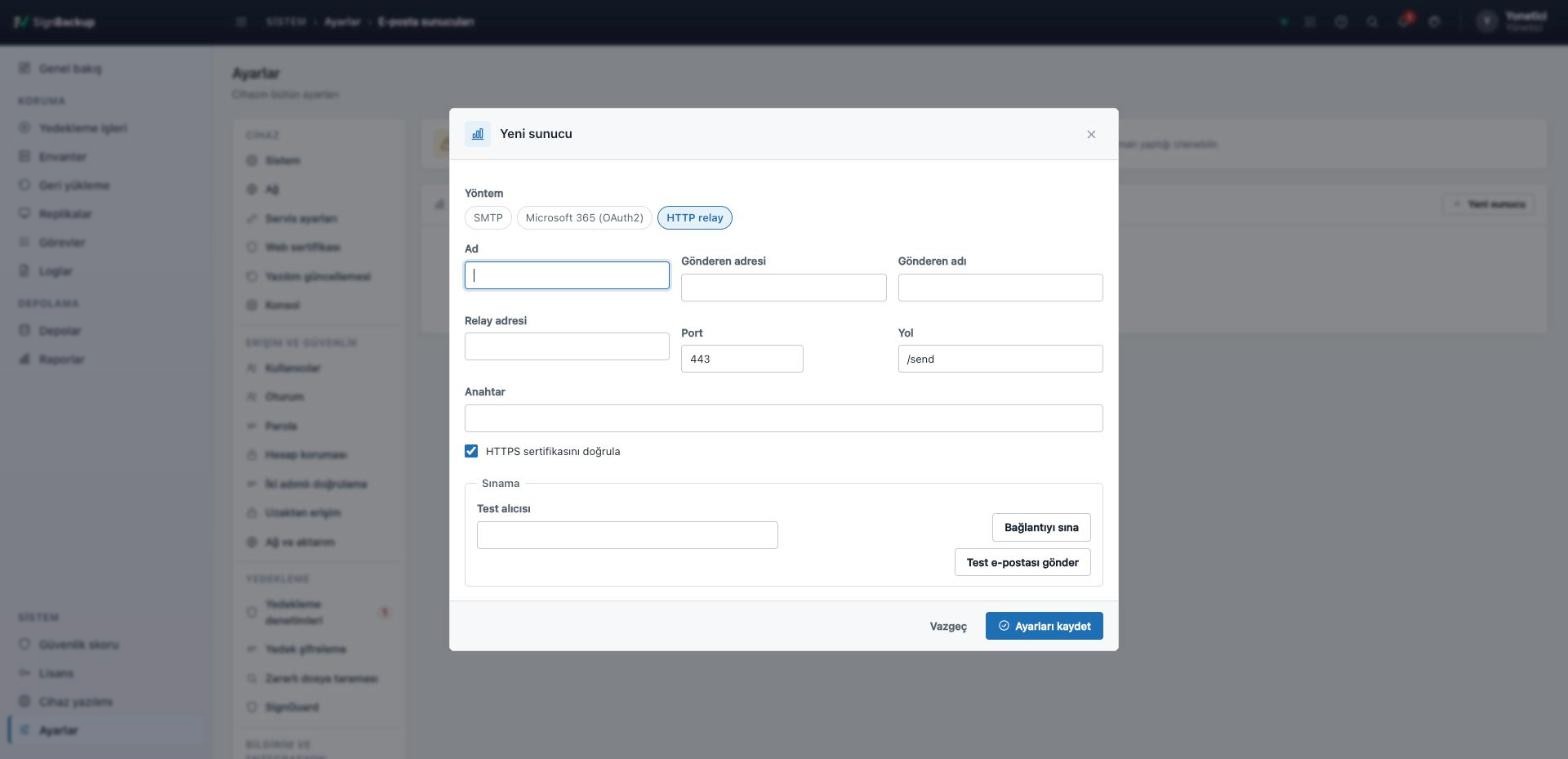
- In Settings › Email servers, define a server with New server; test it with Test connection and Send test email.
- If SMS will also be sent, define a provider in Settings › SMS providers and select it in Two-factor authentication; notifications use the same provider (SMS providers).
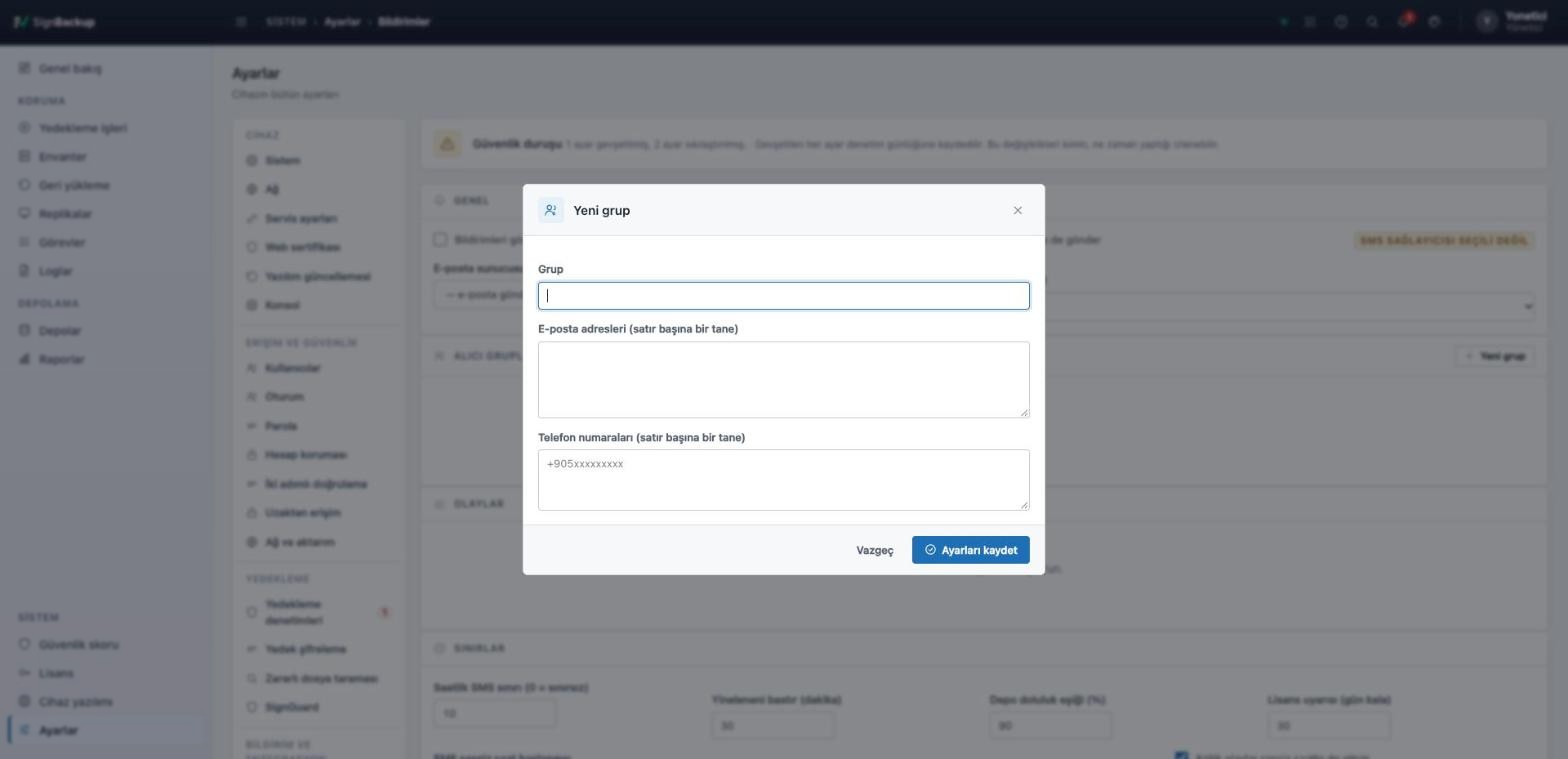
- In Settings › Notifications, create at least one recipient group with New group.
- In the Events table, check the groups each event is sent to by Email and SMS.
- In General, turn on Send notifications, select the email server and click Save settings.
Email servers
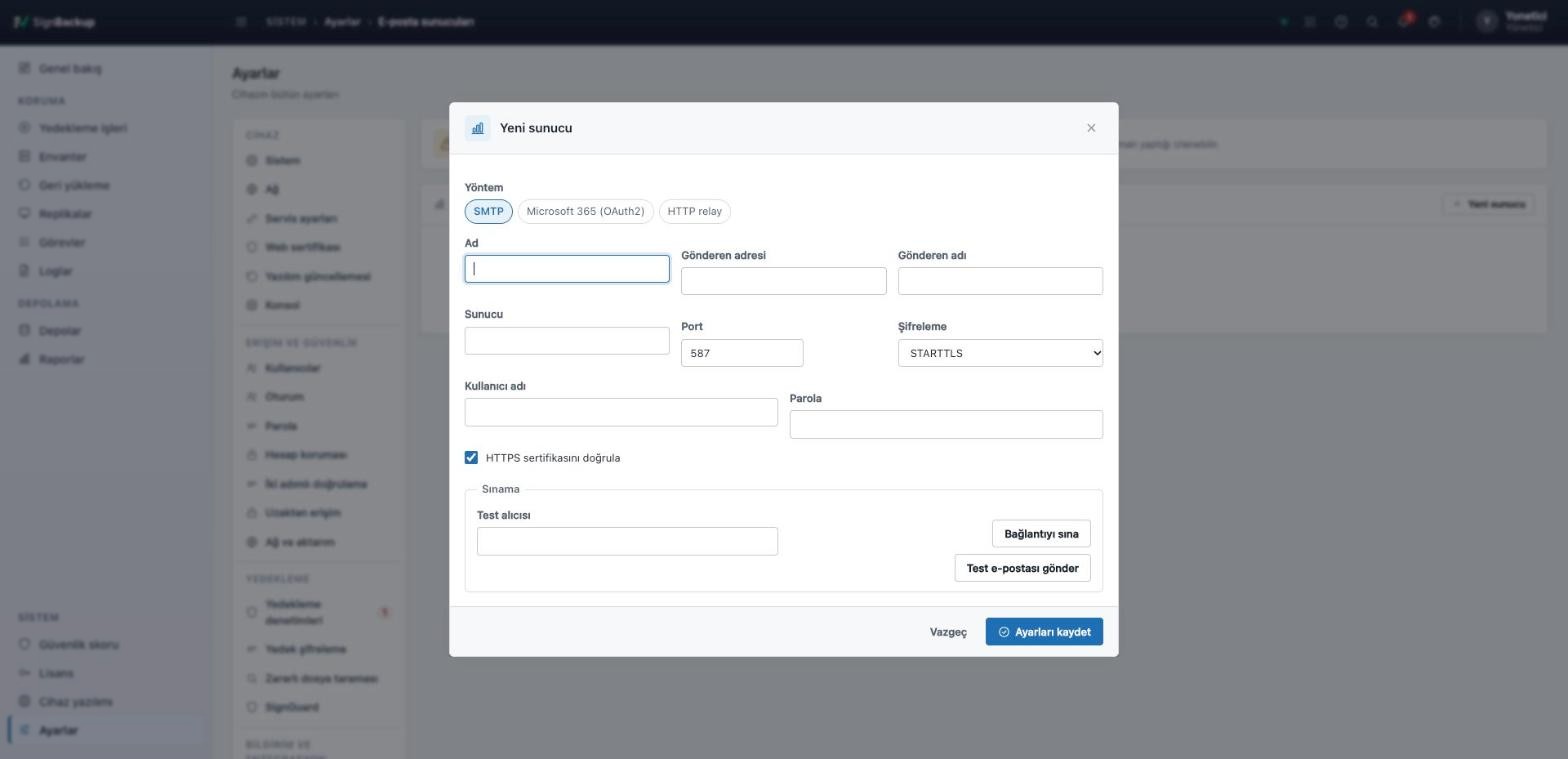
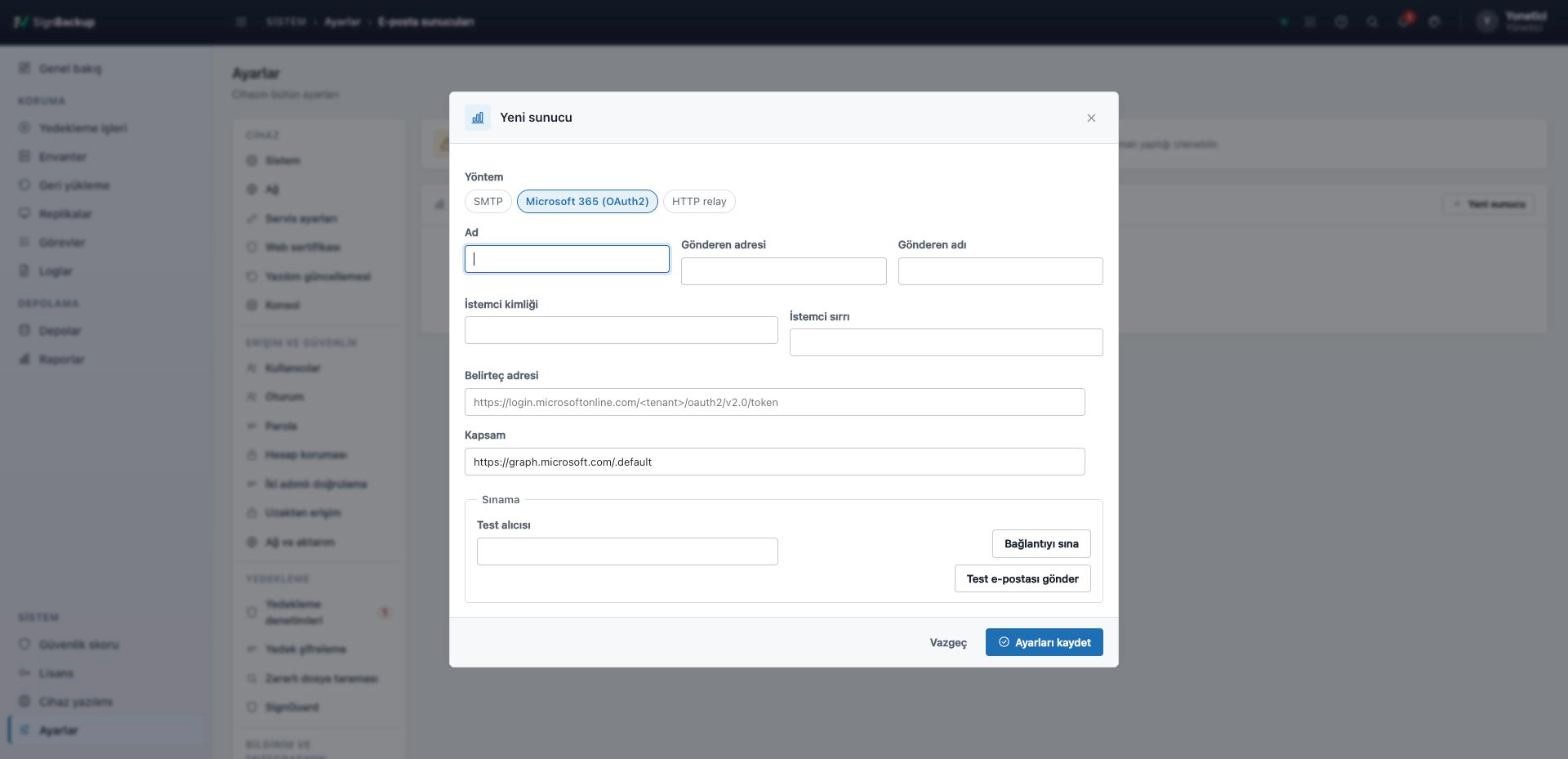
Several servers can be defined; the one to use is selected in Notifications › General. The method is chosen with the tab at the top of the window and cannot be changed after saving.
| Method | Fields | Note |
|---|---|---|
| SMTP | Server, Port (587), Encryption (STARTTLS / SSL / TLS / None), Username, Password, certificate verification | When Encryption is None, the username and password are not sent; if authentication is required, select STARTTLS or SSL. |
| Microsoft 365 (OAuth2) | Client ID, Client secret, Token URL, Scope | Requires an app registration in Entra ID and the Microsoft Graph Mail.Send application permission (with admin consent). The scope is not changed. |
| HTTP relay | Relay address, Port (443), Path (/send), Key | The key is sent in the X-API-Key and Authorization: Bearer headers. Body: from, to, subject, body, html. |
Testing
- Test connection — connects and authenticates without sending a message.
- Send test email — sends a short message to the Test recipient address.
- If an error occurs, the server's response is shown in the window.
Recipient groups
A group is a named list of email addresses and phone numbers. Recipients do not need an account on the appliance.
- One address or number per line; numbers with the country code (
+905xxxxxxxxx). - Test in the row sends a test message to everyone in the group.
- If a group is deleted, the rules assigned to that group are removed too.
Events
Next to each event, you check the groups it is sent to by Email and SMS; an unchecked event goes to no one. When there are no groups, Create a recipient group first. is shown instead of the table.
| Section | Events |
|---|---|
| Backup | Backup completed, completed with warnings, failed, cancelled; backup deleted |
| Restore | Completed, failed |
| Immutable backup | Period changed; emergency deletion request opened, cancelled; immutable backup deleted in an emergency |
| Backup copy (on the receiving appliance) | Copy received from the peer appliance |
| Security | Malware found in a backup; failed sign-in attempt; peer appliance's request rejected (critical, on the receiver); appliance pairing changed (on the receiver) |
| Repository | Repository could not be connected; repository filling up |
| System | License expiring, appliance unlicensed; firmware installed; shutdown / restart; configuration changed |
Email vs. SMS
| Channel | Content |
|---|---|
| Detailed: event, job or machine name, time, account that performed the action, detail line. | |
| SMS | Short, fixed format: cihaz adı: olay adı - iş adı (appliance name: event name - job name). Example: sb-merkez: Yedek alınamadı - Günlük sunucular (Backup failed - Daily servers). There is no template and the text cannot be edited; details are only in the email. |
General, Limits and Daily summary
| Setting | Default | Range | Behavior |
|---|---|---|---|
| Send notifications | Off | — | When off, no notifications are sent; the settings are kept. |
| Also send by SMS | Off | — | When off, only email is sent. Sign-in codes are not affected. If no SMS provider is selected, a warning label appears next to it. |
| Notification language | Turkish | Turkish / English | Independent of the interface language. |
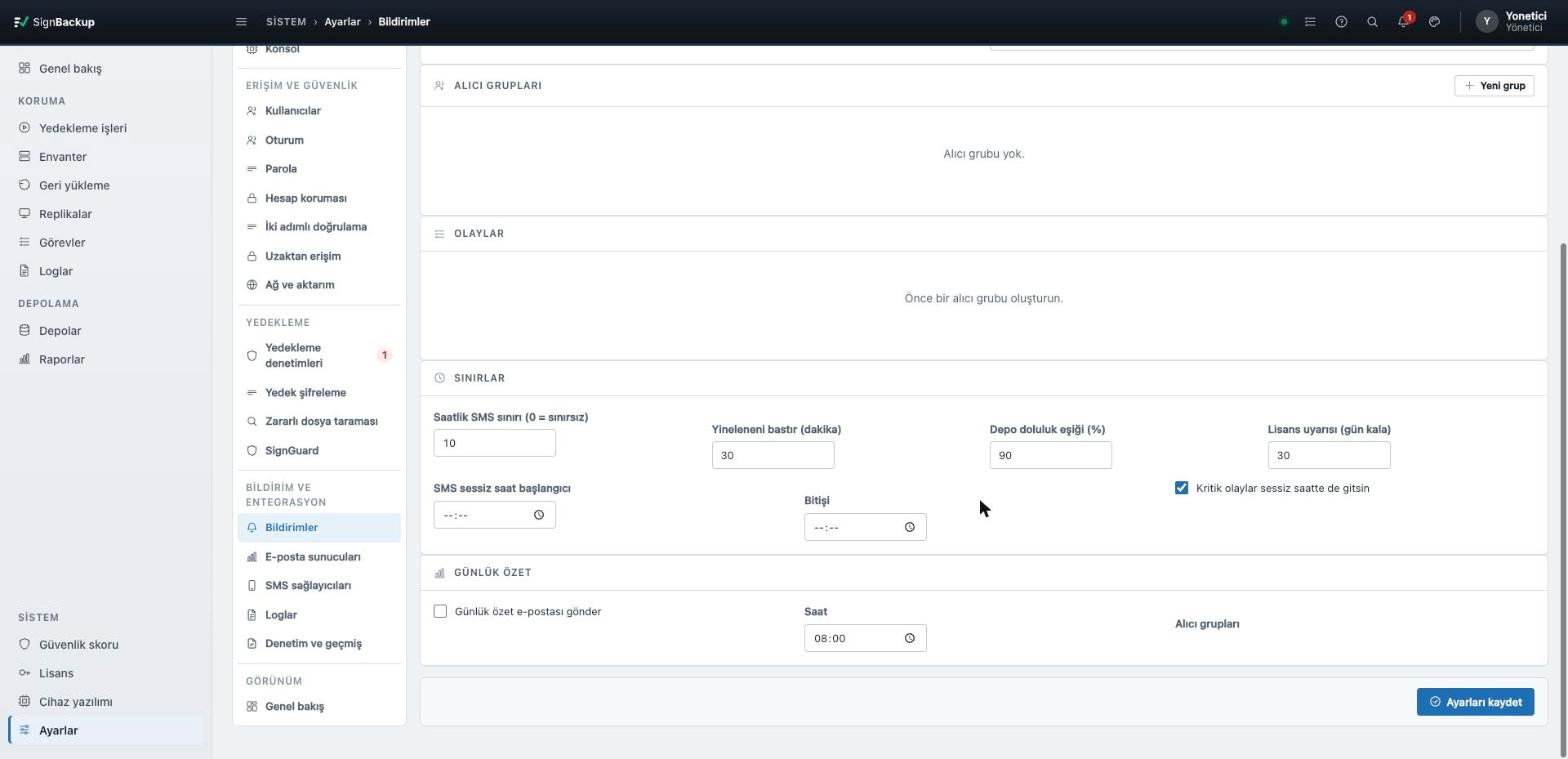
| Hourly SMS limit | 10 | 0–1000 (0 = unlimited) | When exceeded, a single "limit exceeded" SMS is sent and further messages are suppressed. |
| Suppress duplicates (minutes) | 30 | 0–1440 (0 = off) | The same event (for the same job) is not reported again within this period. |
| Repository usage threshold (%) | 90 | 0 or 50–99 | "Repository filling up" once a day when the threshold is reached. |
| License warning (days left) | 30 | 0–365 | "License expiring" once a day. |
| SMS quiet hours | Empty (off) | HH:MM–HH:MM | No SMS is sent in this range; email is not affected; the range can cross midnight (22:00–07:00). |
| Send critical events during quiet hours too | On | — | Critical events such as "Backup failed" and "emergency deletion request" are sent by SMS even during quiet hours. |
| Daily summary email | Off · 08:00 | — | A single email to the selected groups at the selected time: event counts for the last 24 hours, critical events, repository usage, license status. |
Recent notifications
At the bottom of the page, the last 20 events are listed with how many emails and SMS messages were sent. Notes: suppressed (duplicate suppression), quiet (quiet hours), limit (hourly SMS limit) or the text of the sending error.
Per-job rule
In the Notification section of the last step of the backup job window, turn on Custom rule for this job and select the groups that job's backup events go to (Backup jobs).
- While the custom rule is on, that job's backup events go only to the groups selected in the job; the general table does not apply to that job.
- An event not checked in the job goes to no one for that job.
- The section appears only if at least one recipient group is defined.
User subscriptions
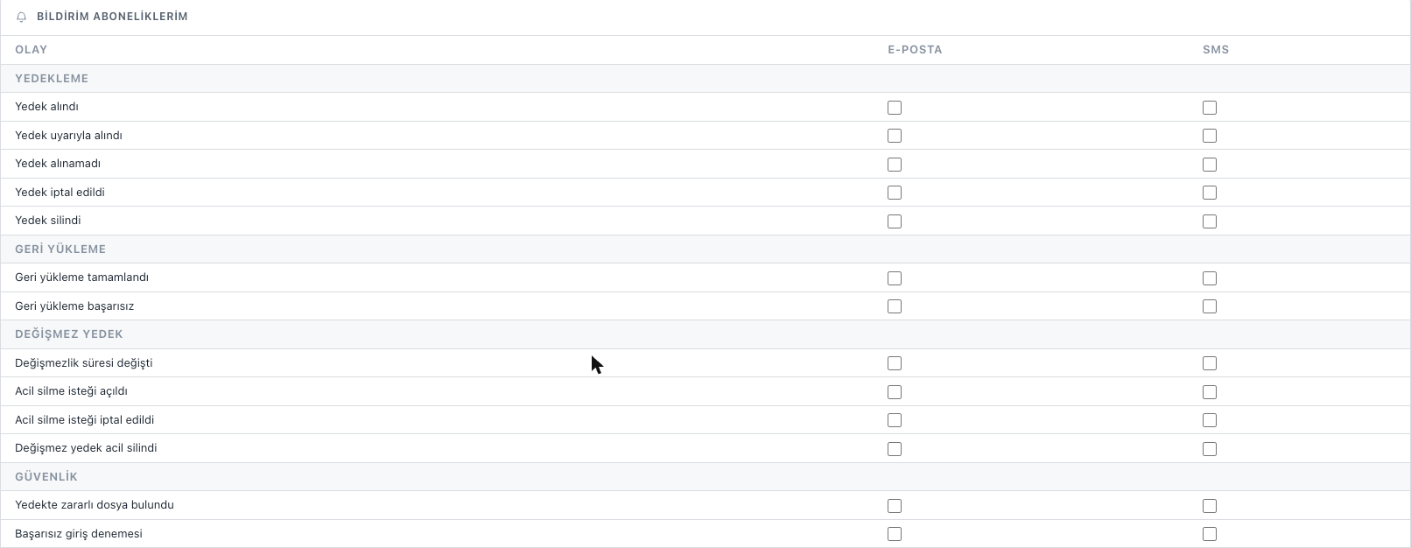
Each user checks the events they want to receive by Email and SMS on the My account › My notification subscriptions card. Messages go to the email address and phone number saved on the account. Subscriptions are added to the general rules; a per-job custom rule does not affect subscriptions. No password is required, and it affects only the user's own account.
Warnings and error messages
| Situation | Meaning | What to do |
|---|---|---|
| No SMS provider selected | SMS cannot be sent. | Define an SMS provider and select it in Two-factor authentication. |
| Connection rejected on unencrypted SMTP | Credentials were given while Encryption is None. | Select STARTTLS or SSL, or clear the credentials. |
| Selected server cannot be deleted | The server is in use in Notifications. | Select another server first. |
| Error text in Recent notifications | Sending failed; the server's response is shown. | Try the server definition with Test. |
Frequently asked questions
Can I change the SMS text?
No. The SMS format is fixed (appliance: event - job); details are in the email.
Does a recipient need an account on the appliance?
No. Any address and number can be entered in groups.
Will a failing job flood my phone?
No. Suppress duplicates (30 min by default) and the hourly SMS limit (10 by default) prevent this.