Backup activity, protected machines and repository usage for the selected period; CSV export.
- Menu path: Left menu › Storage › Reports (
/raporlar) - Who uses it: Every signed-in role (read-only)
Purpose
The Reports page summarizes backup activity, protected machines and repository usage for the selected period in one place. The page is read-only; nothing is changed here.
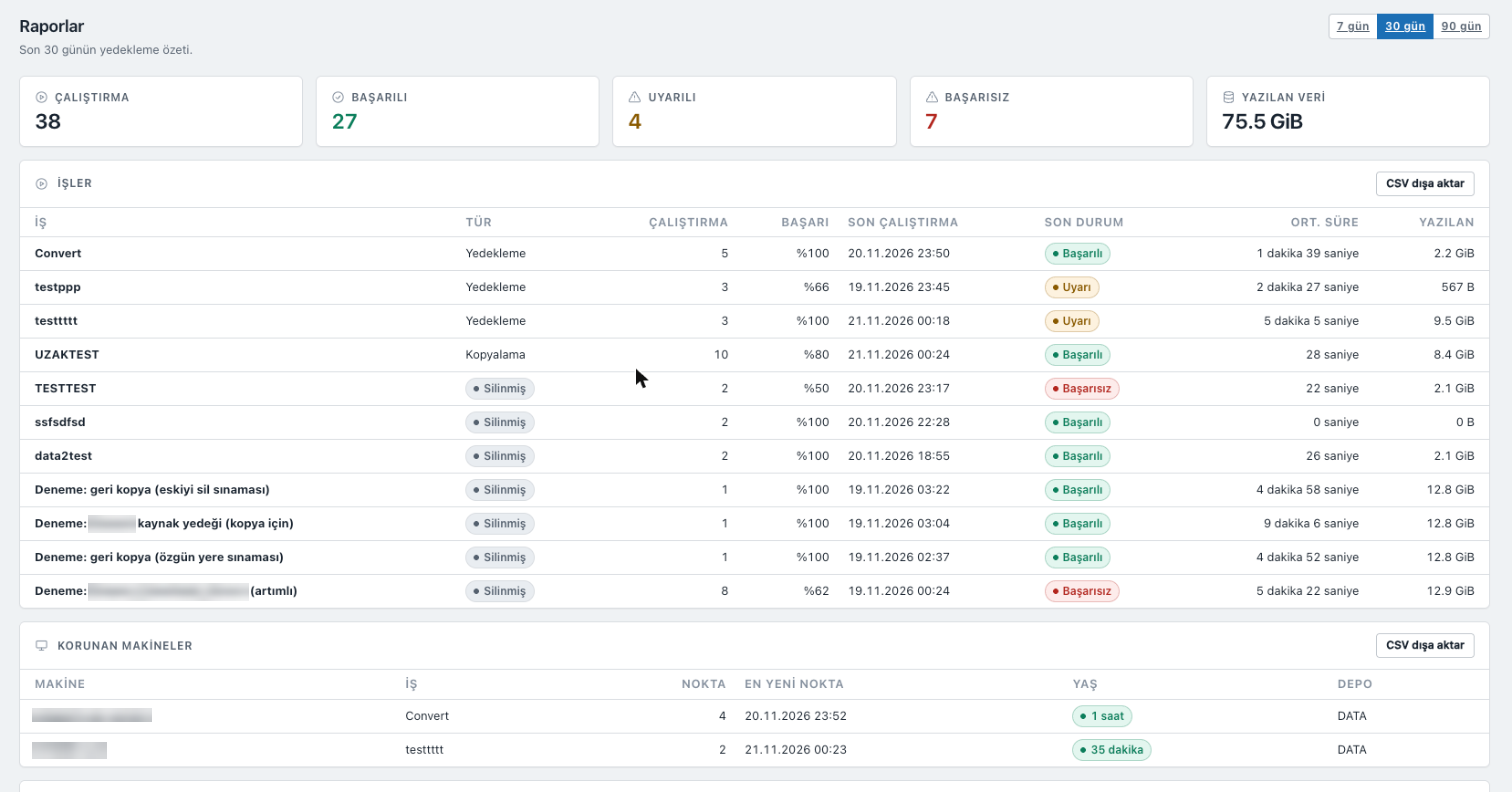
Period and summary
The 7 days, 30 days (default) and 90 days buttons at the top right select the period. The period affects only the summary counters and the Jobs table; protected machines and repositories always show the current state.
| Counter | What it counts |
|---|---|
| Runs | Runs that started and finished within the period. A run still in progress is not counted. |
| Succeeded / With warnings / Failed | Breakdown by result. Cancelled and interrupted runs count toward the total but not toward these three. |
| Data written | Total data written to repositories during the period. |
Runs hidden in Tasks are also counted; hiding them does not change the statistics.
Jobs table
Each job has one row; jobs that did not run at all during the period are listed too.
| Column | Meaning |
|---|---|
| Type | Backup, Copy or Replication. A job that ran during the period and was deleted later shows as Deleted. |
| Success | The ratio of succeeded and with-warnings runs to finished runs. A run with warnings still produced a backup, so it counts as a success. |
| Last run / Last status | The job's most recent run; shown even if it falls outside the period. |
| Avg. duration | The average duration of runs that finished during the period. |
| Written | The data the job wrote to the repository during the period. |
Protected machines and repositories
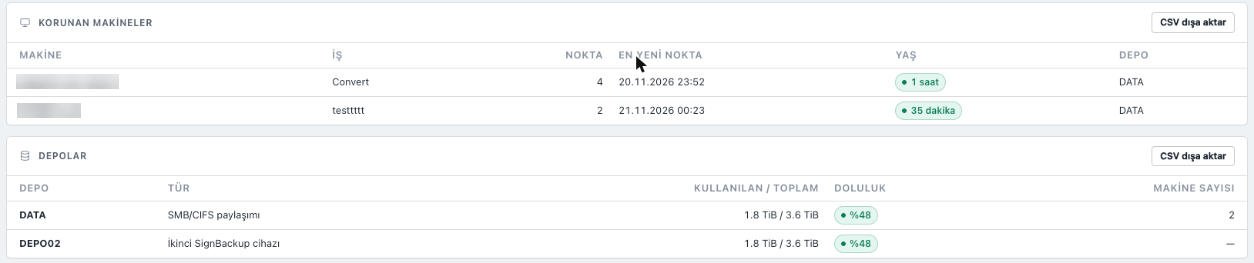
Protected machines
The list is read from the restore points in repositories attached to the appliance. Repositories that are not mounted and remote copy targets (SFTP, S3, second appliance) are not included. If the same machine has chains in more than one repository, each is a separate row.
- Restore points — the number of completed, restorable restore points.
- Age — the age of the newest restore point. Yellow if it is older than the RPO threshold under Settings › Overview (default 24 hours), red if older than three times that. A machine with no restore points shows No restore points.
- If the chain was written by a copy job, the copy job's name appears below the job name.
Repositories
- Used / total and Usage — the capacity measured at the last check; "—" if it could not be measured. The color uses the repository warning threshold of the dashboard (dashboard thresholds).
- Number of machines — the number of machines with restore points in the repository; "—" if the repository is not mounted or is a remote target.
CSV export
Export CSV in each table's header downloads that table for the selected period. The file is UTF-8 and comma-separated. Numbers are written raw: sizes in bytes, durations in seconds, ages in days.
Frequently asked questions
Why doesn't the report match the count in Tasks?
The report counts only finished runs and is limited to the period; Tasks also shows operations in progress.
Why aren't the machines copied to a second appliance in the list?
Protected machines are read only from repositories attached to this appliance. You can see the copies on the Reports page of the receiving appliance.
Can I restore from the report?
No; the page is read-only. Use the Restore page.