Backup targets: a local disk, an NFS/SMB share, or a deduplication appliance.
- Menu path: Left menu › Storage › Repositories (
/depolar) - Who uses it: Configuration: Administrator · view: everyone
Purpose
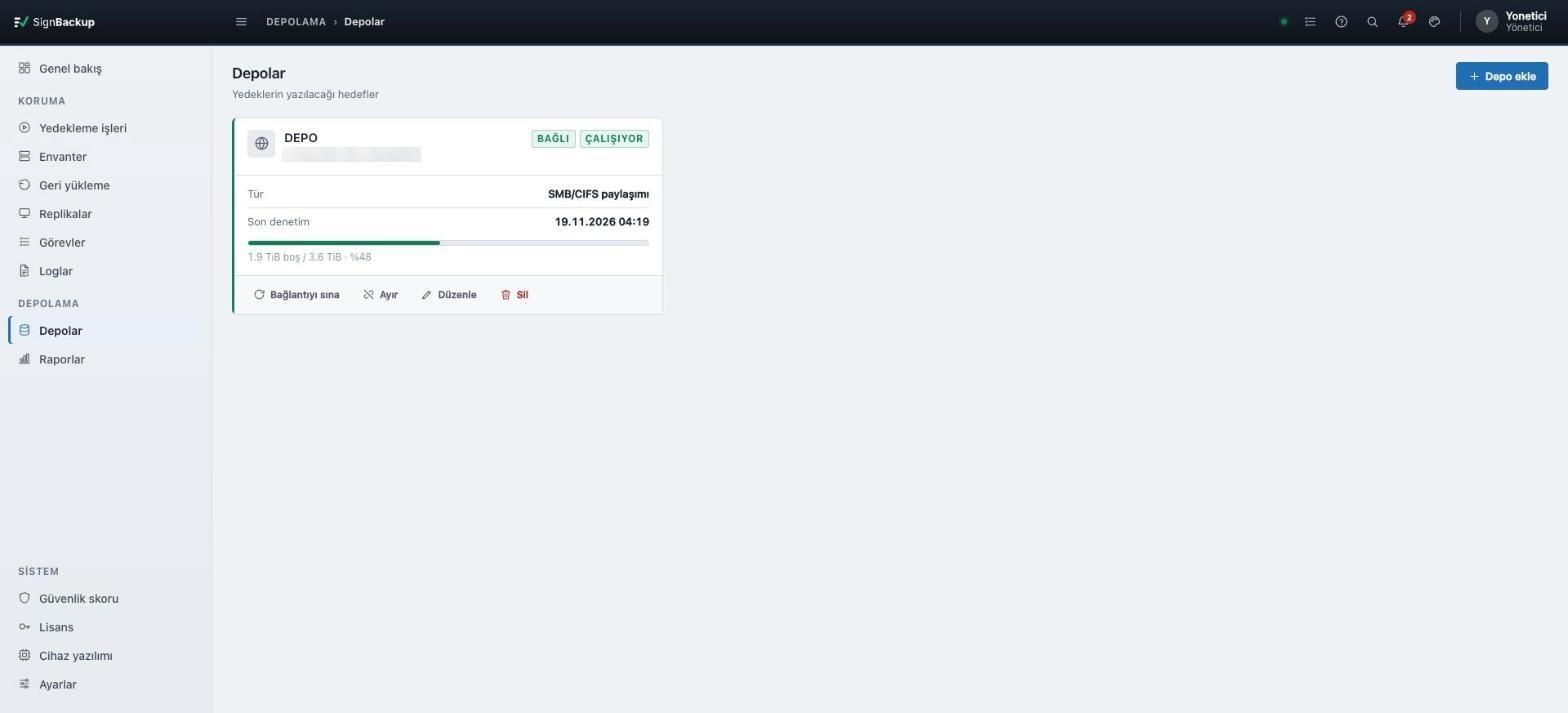
Repositories are the targets that backups are written to: a separate local disk attached to the appliance, an NFS or SMB share, or a deduplication appliance. At least one repository is required to take backups. The SFTP server, S3-compatible object storage and Second SignBackup appliance types are targets for backup copies only (see below).
Step-by-step: adding a repository
- Click Add repository; a two-step dialog opens.
- Select repository type: Standard storage or a backup appliance profile.
- Repository settings: name, type (Local disk / NFS / SMB), Enabled.
- For a local disk, choose the disk from the Select disk list; for NFS/SMB, enter the location and, if needed, credentials. Apply recommended settings fills in the mount options suited to the profile.
- Save. For a network repository, click Mount, then Test connection.
Fields and options
Repository type
| Option | Behavior |
|---|---|
| Standard storage | Local disk, NFS or SMB. SignBackup performs compression and deduplication. |
| Dell EMC Data Domain, HPE StoreOnce, ExaGrid, Quantum DXi, Veritas InfiniGuard, Other deduplication appliance | Data reduction is left to the appliance: backups are written uncompressed, in large aligned blocks. Local disk cannot be selected; connect via NFS/SMB. |
Repository settings
| Field | Rule |
|---|---|
| Name | Cannot be empty, at most 128 characters, unique. |
| Type | Local disk, NFS share, SMB/CIFS share; as copy targets only: SFTP server, S3-compatible object storage and Second SignBackup appliance. |
| Enabled | Backups are not written to a disabled repository. |
| Select disk (local) | The appliance detects disks on its own. Disks that cannot be selected: Unavailable, Not ready — needs to be formatted and mounted, Already assigned to a repository. Removable disks are labeled. |
| Location (NFS/SMB) | NFS nas01:/volume1/backup, SMB //nas01/backup. The same location cannot be used by two repositories. |
| Mount options | Optional. Recommended: NFS vers=4.2,hard,timeo=600,retrans=2, SMB vers=3.1.1; 1 MB read/write size for appliance profiles. nosuid,nodev,noexec is always added. |
| Username / Domain / Password (SMB) | Username is required. When editing, an empty password keeps the existing one; if the location, user or domain changes, the password must be re-entered. |
The mount point is not entered manually; the appliance generates it under /mnt/sign_backup from the repository ID.
Card buttons
| Button | What it does |
|---|---|
| Test connection | Checks reachability, writability and free space; writes the result to the card. |
| Mount / Unmount | NFS and SMB only. A repository cannot be unmounted while a job or a restore that uses it is running: Bu depoyu kullanan iş sürüyor (…); depo ayrılamaz. (a job using this repository is running; it cannot be unmounted). Try again when the job has finished or been stopped. |
| Edit | Opens the form. |
| Delete | Asks for confirmation. The repository is only removed from the list; data on the disk is not deleted. Backups in a deleted repository do not appear in Restore. |
| Status / bar | Meaning |
|---|---|
| Healthy Attention Error Unknown | The result of the last check. Network repositories also show Mounted / Not mounted. |
| Usage bar | On the card, yellow at 75% and red at 90%. Unknown if the capacity cannot be read. |
Immutable backups
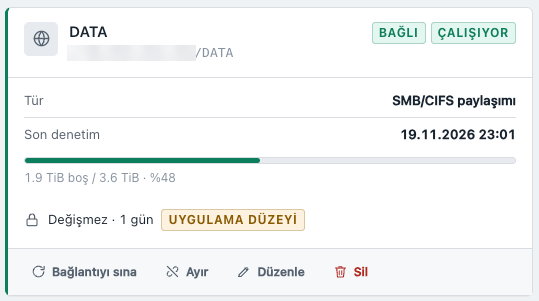
If an immutability period (days) is set on a repository, every backup written to that repository cannot be deleted or modified for that period, counted from the moment it was taken. The purpose is to protect backups against ransomware and a compromised administrator account.
- Before the period ends, not even the retention rule can delete the backup; the repository may use more space than its retention setting implies.
- GFS restore points (weekly, monthly, quarterly, yearly) stay immutable for their own retention periods.
- The period is counted from the moment each backup was taken. On the first backup after the period is turned on, the machine's older restore points whose period has not yet expired are also marked (e.g. with a 7-day period, a backup taken 3 days ago is protected for 4 more days).
- Shortening or turning off the period does not shorten the period of backups already marked.
- Immutable backups require a license; without a license, the card shows an Immutability · License required label (Advanced features).
- The period cannot be ended early by setting the appliance clock back, nor by setting it forward (see Clock jump warning below). The lock cannot be removed from the support shell either.
Clock jump warning
If the system clock moves forward by more than the Immutability clock-jump threshold (default 24 hours), a warning appears at the top of the Repositories page showing the safe time, the system time and the threshold. If the clock is correct (e.g. the appliance was off for more than 24 hours), the immutability officer clicks Confirm clock with a verification code (TOTP). Until it is confirmed, immutable backups whose period has expired stay locked; backups continue. The event is written to the audit log and a notification is sent.
Who sets it
- The Administrator creates an account with the Immutability officer role in Settings › Users. This role cannot change anything else. Roles
- The officer registers an authenticator app (TOTP) on the account; without it, immutability cannot be turned on.
- When signed in with the officer account, the Immutability button appears on the repository card. In the dialog, enter the Period (days) (0 turns it off) and the 6-digit Verification code from the app. SMS codes and recovery codes are not accepted.
- After saving, the message Immutability period saved. appears; the card shows Immutable · N days and the protection level label.
Protection level
The repository card states the level of protection explicitly:
| On the card | Meaning |
|---|---|
| Operating system lock | In a repository on the appliance's own disk, the files are also locked by the operating system. |
| Application level | On network shares (NFS, SMB). SignBackup does not delete a backup whose period has not expired, but anyone with access to the share server could delete the files. For full protection, use the appliance's own disk or also enable WORM / snapshots on the share server. |
To delete a backup before its period expires, use emergency deletion: Restore › Immutable backups and emergency deletion.
Location and bandwidth
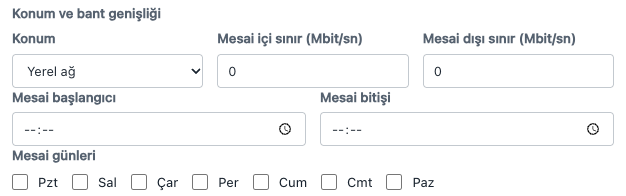
The Location and bandwidth section of the repository dialog determines how much of the link backup copy jobs may use while writing to this repository. The limit belongs to the repository: all copy jobs writing to the same repository share the same limit.
| Field | What it does |
|---|---|
| Location | Local network (default) or Remote site. Remote site indicates that the repository is reached over the internet, a VPN or a low-speed link. |
| Business-hours / Off-hours limit (Mbit/s) | The maximum speed copying may use. 0 means unlimited. |
| Business hours start / end | The hours during which the business-hours limit applies. If left empty, the off-hours limit always applies. |
| Business days | If no day is checked, every day counts as a business day. |
- If business hours begin or end while a job is running, the speed changes at that moment.
- The limit applies only to copy jobs; it does not affect the speed of the primary backup taken from the machine.
- If the copy job also has its own speed limit, the lower one applies.
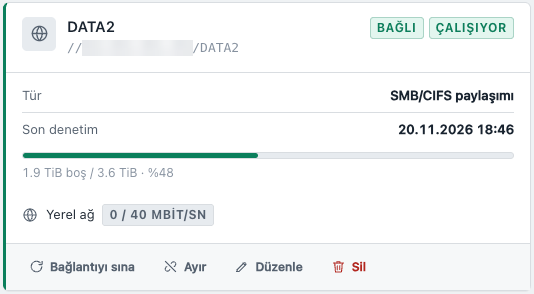
- If the location is Remote site or a limit is entered, the repository card shows the location and a
mesai içi / mesai dışı Mbit/sn(business hours / off-hours Mbit/s) summary.
SFTP server (remote copy target)
A repository of the SFTP server type is not mounted on the appliance; it is accessed encrypted over the internet or a low-speed link, without a VPN. Any Linux server or NAS with SFTP enabled is enough on the other side.
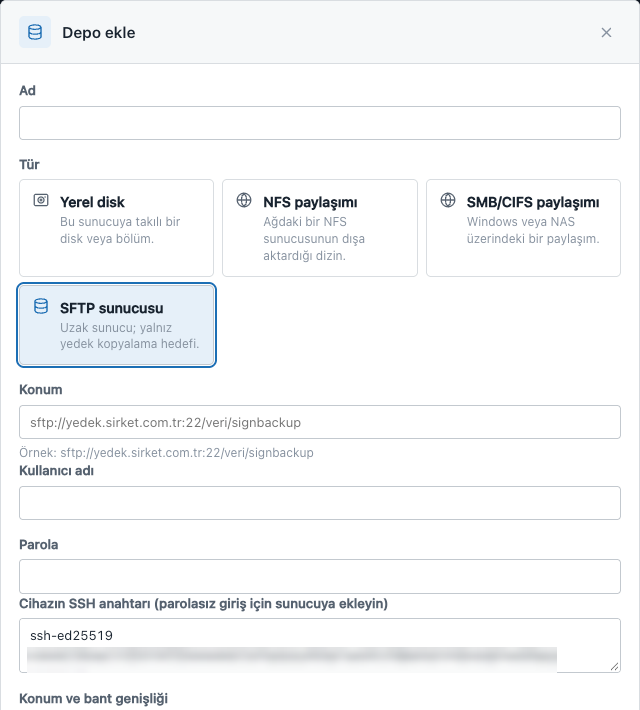
| Field | Rule |
|---|---|
| Location | sftp://sunucu:port/yol (server, port, path; 22 if no port is given). The path is the repository directory on the server; the root directory (/) cannot be used. |
| Username / Password | The appliance's SSH key can be used instead of a password: leave the password empty. |
| Appliance SSH key | Read-only. Add this line to the authorized_keys file of the user on the server. |
| Fingerprint | When the repository is first saved, the server's host key is read and stored. |
Limitations
- It is a copy target only. A backup job cannot write directly to an SFTP repository; the repository is selected as the target of a copy job. The card shows a Copy only label.
- Retention is chain-based. A backup is deleted only when all incremental backups that depend on it can also be deleted. A copy may be kept slightly longer than the rule, never shorter; space is freed when a new full backup arrives and the old chain is deleted together.
- Verification uses the link twice: when Verify copy at target is on, the sent file is read back.
- Restore cannot be done directly; the copy is first fetched back to a repository attached to the appliance.
Fetching back from a remote repository
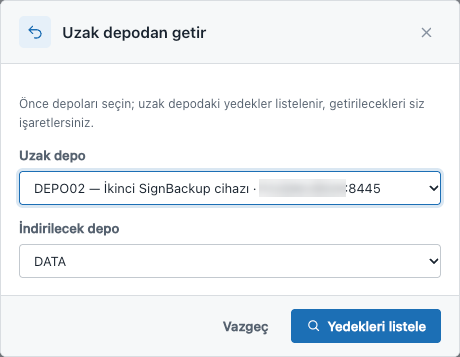
To restore a backup that is in a remote repository, it is first fetched to a repository attached to the appliance. This is done manually: on the Restore page, click Fetch from remote repository, then select the remote repository and the repository to download into.
- The backups in the remote repository are listed; you check which ones to fetch (a single backup, all missing backups of a machine, or several machines). Backups already on this appliance appear as Present and cannot be selected.
- When an incremental backup is selected, the missing backups it depends on are fetched along with it automatically.
- It works even if the job definitions have been lost: whatever is in the remote repository is listed.
- Nothing changes in the remote repository; no retention rule is applied to fetched backups.
- An interrupted download resumes where it left off; the speed is throttled by the remote repository's bandwidth limit. Progress appears on the Restore and Tasks pages.
Fetching back is not a scheduled job: copy jobs only run toward the remote repository.
S3-compatible object storage (remote copy target)
A repository of the S3-compatible object storage type is a bucket in a service that offers the S3 interface, such as AWS S3, MinIO, Wasabi or Ceph. It is not mounted on the appliance; it is accessed over HTTPS. Add it with Add repository › Standard storage › S3-compatible object storage.
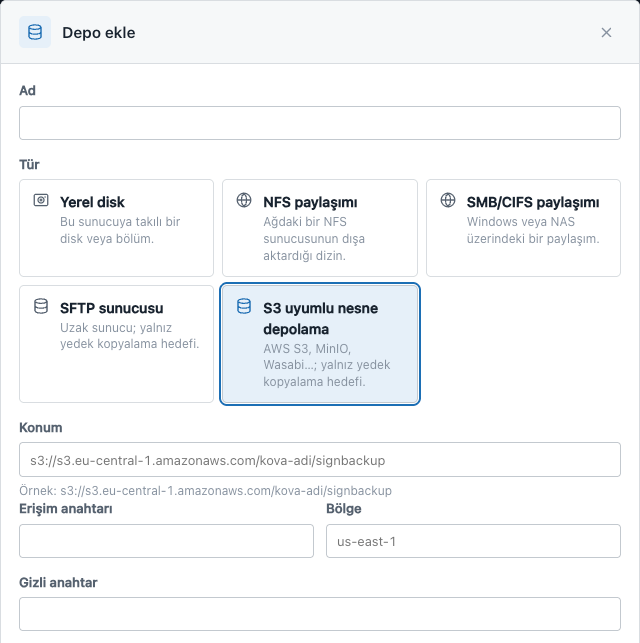
| Field | Rule |
|---|---|
| Location | s3://uç-nokta[:port]/kova[/önek] (endpoint, port, bucket, prefix). Example: s3://s3.eu-central-1.amazonaws.com/sirket-yedek/signbackup. Unencrypted HTTP is used only if s3+http://… is entered; it is meant for test setups on the internal network, do not use it over the internet. |
| Access key / Secret key | The key pair issued by the service. It must have list, read, write and delete permissions on the bucket. |
| Region | If left empty, us-east-1 (sufficient for MinIO and most compatible services). On AWS, enter the bucket's region. |
How it works
- Multipart upload. Large files are sent in parts. If the link drops or the run window ends, the completed parts wait on the service; on the next run only the missing parts are sent.
- Verification does not reuse the link. When Verify copy at target is on, the object's hash on the service (ETag) is compared with that of the local file; the file is not downloaded back. If the service does not provide a hash (e.g. a bucket encrypted with KMS), the object is downloaded and checked.
- Object Lock. If an immutability period is set on the repository and Object Lock is enabled on the bucket, the backup files are also locked on the service side for that period (governance mode). If the bucket has no lock, the files are written unlocked; protection then relies only on the appliance's own rule.
- Free space is not shown: object storage has no concept of capacity.
Limitations
The limitations of the SFTP repository apply unchanged: it is a copy target only (the card shows a Copy only label), retention is chain-based, and to restore, the copy is first downloaded to a repository attached to the appliance with Restore › Fetch from remote repository. In addition:
| Situation | Recommended rule on the bucket |
|---|---|
| In a versioned bucket, a deleted object does not free space (Object Lock requires versioning; deletion only adds a "deleted" marker). | Lifecycle rule: delete noncurrent versions after the lock period. |
| Interrupted multipart uploads take up space on the service if the job never runs again. | Lifecycle rule: delete incomplete multipart uploads after N days. |
Second SignBackup appliance (remote copy target)
A repository of the Second SignBackup appliance type is another SignBackup appliance (the receiver). Copies are written to the receiver's repository in the usual layout and appear directly on the receiver's Restore page: no fetching back is needed at the disaster recovery site.
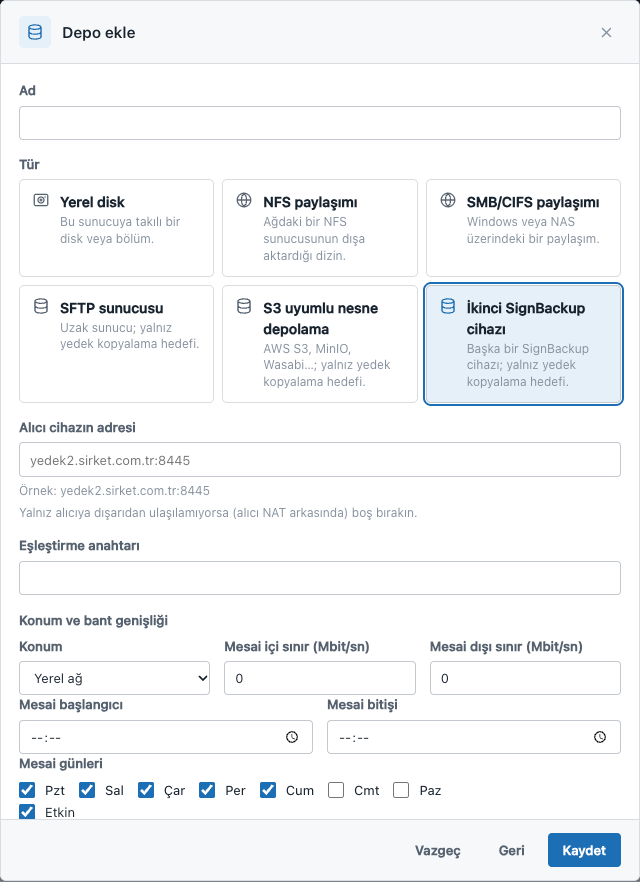
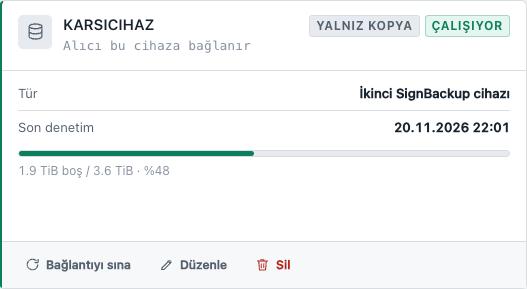
| Field / rule | Description |
|---|---|
| Pairing key | Generated on the receiver under Settings › Appliance-to-appliance copy and shown once. |
| Receiving appliance address | sunucu:port (server:port; 8445 if no port is given). This appliance can be behind NAT; it initiates the connection, so no port forwarding is needed. Leave it empty only if the receiver cannot be reached from outside: then this appliance's copy port must be open and this appliance's address must be entered in the pairing on the receiver; the receiver connects on its own. |
| Retention is on the receiver | The copy job's retention rule is not applied on the receiver; this appliance cannot delete anything on the receiver. |
| Verification is on the receiver | The link is not used a second time. |
| Interrupted transfer | Resumes where it left off; the speed is throttled by the repository's bandwidth limit. |
Receiver-side setup, connection direction and security: Appliance-to-appliance copy.
Warnings and error messages
| Message | Meaning | What to do |
|---|---|---|
| This operation can only be performed with the immutability officer account. | The Administrator or another role tried to change immutability. | Sign in with the officer account. |
| This operation requires an authenticator app (TOTP) registered on your account. … | The officer account has no TOTP. | Set up the authenticator app from My account. |
| Incorrect verification code. | The code is wrong or has expired. | Enter the current code from the app. |
| Attention (below 10 GiB) | The repository has less than 10 GiB of free space. | Shorten retention or free up space. |
| Mount option rejected | suid, dev, exec, remount, bind, loop are not accepted for security reasons. | Remove these options. |
| No data disks | The appliance has no disk other than the root disk. | Add a disk to the virtual machine and restart the server; the disk will appear in the list. |
| Not mounted | The NFS/SMB share is not mounted. | Mount; if that fails, check the location, credentials and share permissions. |
| Password not carried over | The location/user/domain changed. | Re-enter the password. |
Related settings
The usage threshold on the dashboard is set with Settings › Overview › Repository usage warning (%) (default 80). The space that must remain in the repository before a backup is Settings › Backup pre-checks › Minimum free repository space after backup (GB) (default 20). Details
Frequently asked questions
Can the Administrator turn off immutability?
No. Only the Immutability officer turns it on or changes the period, using a TOTP code; shortening the period does not shorten it for backups already marked.
Does an immutable repository on a network share give full protection?
No, it is application level only: SignBackup does not delete, but someone with access to the share server could. Also enable WORM/snapshots on the share server, or use the appliance's own disk.
Can I open a backup copied to a second appliance there without fetching it back?
Yes. Copies appear directly on the receiver's Restore page; if they are encrypted, the sender's recovery key is required.
Does the appliance create the S3 bucket itself?
No. The bucket must be created on the service in advance; if Object Lock is needed, it must be enabled when the bucket is created.
Can backups be taken directly to an SFTP repository?
No. SFTP (and S3) are copy targets only; the backup is first taken to a repository attached to the appliance, and a copy job moves it to SFTP. To restore, the copy is likewise first downloaded with Restore › Fetch from remote repository.
Does the bandwidth limit also slow down the primary backup?
No. It applies only to copy jobs writing to this repository.
If I delete a repository, are the backups deleted?
No. Only the definition is removed and the network share is unmounted; the files stay on the share or disk.
Why can't the repository be deleted?
A repository that is the target of a job cannot be deleted: There are jobs using this repository: … First move the jobs to another repository or delete them. The message lists the jobs that use it.
Why is there no local disk option for deduplication appliances?
The profiles leave data reduction to the appliance; these appliances are connected via NFS or SMB.
Can two SignBackup appliances use the same repository?
Yes, but if one appliance's backup is password-protected it shows as Locked on the other; if it has no password, it is opened with the product lock.