Making a second SignBackup appliance a backup copy target: typical setup, pairing, the copy port and security.
- Menu path: Receiver: Settings › Backup › Appliance-to-appliance copy (
/ayarlar?grup=cihazkopya) · Sender: Repositories › Add repository - Who uses it: Administrator only
Purpose
Appliance-to-appliance copy makes one SignBackup appliance the backup copy target (receiver) of another SignBackup appliance. The sending appliance copies its backups here; the copies are written to the receiver's repository in the usual layout and appear on the receiver's Restore page directly, with no extra step. At the disaster recovery site, a machine can be brought up without fetching anything back first.
| Side | Where | What is done |
|---|---|---|
| Receiver (e.g. a reseller's data center) | Settings › Appliance-to-appliance copy (/ayarlar?grup=cihazkopya) | Opens the copy port, creates a pairing, and sets the target repository and retention. |
| Sender (e.g. a customer, may be behind NAT) | Repositories › Add repository › Standard storage › Second SignBackup appliance | Adds the receiver as a repository and sets up a copy job to that repository. |

Typical setup
Example: a reseller installs SignBackup in a data center; the appliances at its customers copy their backups there. Because the customer appliance initiates the connection, the customer can be behind NAT and no port forwarding is needed. There is no separate setting for the connection direction.
- On the receiver (data center), go to Settings › Appliance-to-appliance copy: check Copy port open and save.
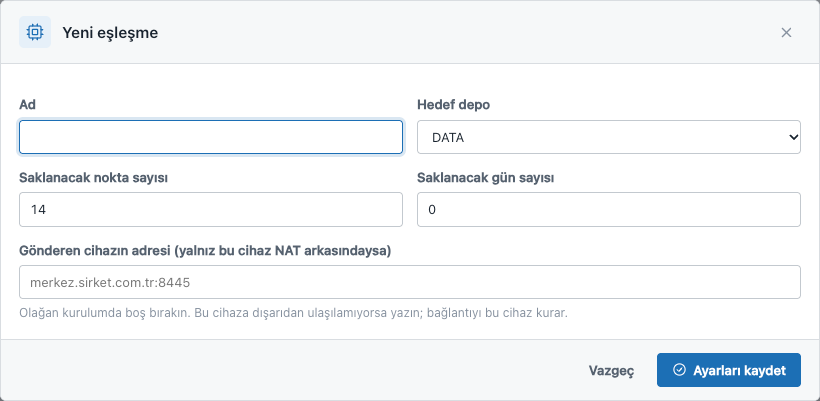
- On the receiver, click New pairing: enter a name, the target repository and the retention rule; in a typical setup, leave Sending appliance address empty. After saving, the pairing key is shown only once; the Now, on the sending appliance card below it contains the address to enter in the repository and a copy button.
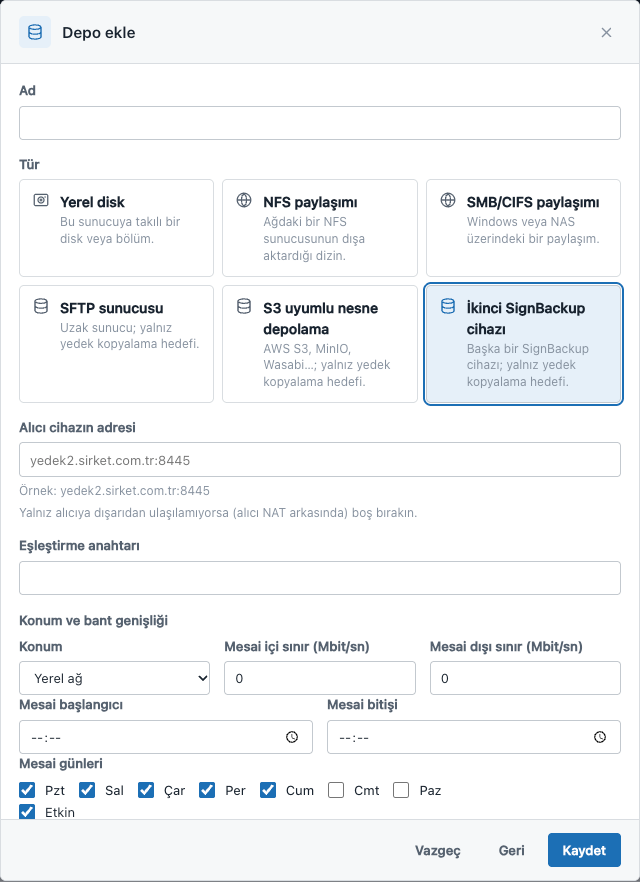
- On the sender (customer), go to Repositories › Add repository › Standard storage › Second SignBackup appliance: enter the receiver's address and the key.
- On the sending appliance, create a copy job that targets this repository.
Create a separate pairing for each sending appliance: each gets its own key, repository and retention rule, and revoking one does not affect the others.
Fields
Receiver · Copy port
| Field | Default | Rule |
|---|---|---|
| Copy port open | Off | Enable it only on the side the other appliance connects to. When enabled, it is also opened in the firewall. |
| Port | 8445 | 1024–65535. Separate from the management interface port; only this port is forwarded to the internet. |
Receiver · New pairing
| Field | Default | Rule |
|---|---|---|
| Name | — | Required, at most 64 characters. |
| Target repository | First repository | Must be an enabled repository attached to the appliance. |
| Number of restore points / days to keep | 14 / 0 | At least one must be entered. This rule applies to the copies on the receiver; the retention rule of the copy job on the sender does not apply here. |
| Sending appliance address (only if this appliance is behind NAT) | Empty | Left empty in a typical setup. Only if the receiver cannot be reached from outside, enter sunucu (server) or sunucu:port (server:port); the receiver then establishes the connection. |
Receiver · Now, on the sending appliance
Appears below the key once the pairing is saved and states what to do on the sender:
| Situation | On the card |
|---|---|
| Typical setup (address empty) | Address to enter in the repository and a copy button. If the sender reaches this appliance at a different address (public IP or domain name), enter that one. If the copy port is closed, a "the sender cannot connect" warning appears. |
| Receiver behind NAT (address filled in) | Tells you to leave the address empty on the sender, enter only the key, and open the sender's copy port. |
Sender · Second SignBackup appliance repository
| Field | Rule |
|---|---|
| Receiving appliance address | sunucu:port (server:port; 8445 if no port is given). Left empty only if the receiver cannot be reached from outside (receiver behind NAT). |
| Pairing key | The key shown once on the receiver. |
| Location and bandwidth | As on other repositories; an interrupted transfer resumes where it left off and the speed is throttled by this limit. Details |
Pairings table
| Column | Meaning |
|---|---|
| Name | The short code below it is the pairing ID (the non-secret part of the key); it appears in logs under this code. A pairing where the receiver establishes the connection shows a Reverse connection label. |
| Target repository | The repository the copies are written to; No repository if it has been deleted. |
| Retention | E.g. 14 nokta (14 restore points), 30 gün (30 days). |
| Last connection | The last time the sender connected; Not connected yet if it never has. If the receiver establishes the connection and cannot, the last error is shown below. |
| Data received | Total data received from this pairing to date. |
If the receiver is behind NAT
Needed only if the receiver cannot be reached from outside (e.g. an appliance at headquarters sends copies to a branch with no port forwarding). In this case the receiver establishes the connection:
- On the sender, open the copy port under Settings › Appliance-to-appliance copy.
- On the receiver, enter the sender's address and copy port in the pairing's Sending appliance address field.
- On the sender, when adding the repository, leave the address empty and enter only the key. The repository card shows The receiver connects to this appliance instead of an address.
No further setting is needed on the sender: when the receiver connects, the sender uses that connection automatically.
| Situation | What to do |
|---|---|
| The receiver can be reached from outside (typical) | Open the copy port on the receiver; the sender enters the receiver's address in the repository. |
| Only the sender can be reached | The three steps above. |
The copy port is separate from the management interface port; only this port is opened to the internet. When enabled, it is also opened in the appliance's firewall.
Security
- The pairing key carries a 256-bit secret and is never sent over the link. After the TLS 1.3 connection is established, the two appliances prove they know the key with a proof bound to that connection; an interceptor cannot relay this proof.
- The sender cannot delete anything. The receiver applies retention. Even if the sender is compromised, the copies on the receiver cannot be deleted, a completed file cannot be overwritten, and the chain record cannot be shrunk.
- Verification is done on the receiver: the hash of every incoming file is computed on the receiver; a file that does not match is rejected. The link is not used a second time.
- If an immutability period is set on the receiver's repository, incoming copies are also marked with that period.
- Pairings are isolated from each other: two senders writing to the same repository cannot see, read or overwrite each other's copies; the receiver's own backups are not visible to senders either.
- If a pairing is disabled or deleted, the sender is rejected immediately (even with an open connection). Copies already received stay in the repository.
Retention and restore
The number of restore points and/or days in the pairing applies to the copies on the receiver. Retention is chain-based: a full backup is deleted together with the incremental backups that depend on it once all of them can be deleted. A copy may be kept slightly longer than the rule, never shorter.
The restore-point count rule does not delete copies received in recent days, measured by the receiver's clock (Protect received copies from the count rule, default 7 days): even if the sender pushes fake restore points, recently received genuine copies are kept. During this period the repository may hold more restore points than the rule allows; the day rule and immutability are not affected.
Copies are listed on the receiver's Restore page under the job name on the sender. Encrypted backups require the sending appliance's recovery key (Backup encryption). Copies can also be fetched back to the sending appliance: on the sender, Restore › Fetch from remote repository.
Notifications
The receiving appliance generates three events, which are linked to groups in the Notifications event table: Copy received from peer appliance (backup), Peer appliance request rejected (security, critical) and Appliance pairing changed (security).
Warnings and error messages
| Message | Meaning | What to do |
|---|---|---|
| A pairing name is required (at most 64 characters). | The name is empty or too long. | Enter a short name. |
| A retention rule is required: enter a number of restore points or days. | Both are 0. | Enter at least one. |
| The sending appliance address must be in the form "server" or "server:port". | The address format is wrong. | E.g. merkez.sirket.com.tr:8445. |
| The target must be an enabled repository attached to the appliance. | The selected repository is SFTP/S3/a second appliance, or disabled. | Select a local disk, NFS or SMB repository. |
| There is no enabled repository attached to the appliance. … | The receiver has no repository to write copies to. | First add a repository under Repositories. |
| Enter a valid port (1024–65535). | The port is out of range. | Enter a port within the range. |
| The system service could not be reached; the copy port cannot be changed. | The service that manages the firewall is not responding. | Check the service status; if it persists, contact support. |
Frequently asked questions
If the sending appliance is compromised, can the copies on the receiver be deleted?
No. The sender cannot delete or overwrite anything on the receiver; only the receiver applies retention.
I lost the pairing key.
The key is shown only once and cannot be read back. Delete the pairing, create a new one, and enter the new key in the repository on the sender. Copies already received stay in the repository.
The customer appliance is behind NAT; is port forwarding needed?
No. In a typical setup the sender (customer) initiates the connection; only the receiver (data center) needs the copy port open.
Do I have to open the copy port on the receiver?
In a typical setup, yes. If the receiver cannot be reached from outside, the port is opened on the sender, the sender's address is entered in the pairing on the receiver, and the receiver connects.
Do I need to fetch a copy back before restoring it on the receiver?
No. Copies appear directly on the receiver's Restore page; if they are encrypted, the sender's recovery key is required.