The console and SSH management menu: sign-in, options, factory reset, support shell.
- Menu path: Appliance console / SSH · Settings › Device › Console
- Who uses it: Web panel accounts; options that make changes: Administrator
Purpose
When you connect to the appliance console (physical screen, hypervisor console, serial line) or over SSH, a management menu opens instead of a shell. The menu offers what you need to bring the appliance back up when the web interface is unreachable: status, network address, unlocking, SSH, web certificate, reboot, factory reset.
You sign in to the menu with your web panel username and password; the same rate limit, account lockout and audit logging apply as for web sign-in. The sign-in screen shows the appliance's IP addresses; if a DHCP address arrives later, the screen is redrawn.
Step-by-step
- Connect on the console or with
ssh <kullanıcı>@<cihaz>(user, appliance); the "SignBackup management console" screen opens. - Enter your Username and Password (3 attempts; a 2 s wait after each failure).
- If two-factor authentication is required for SSH, enter the code; if the SMS method is available, request an SMS with
s; a recovery code is also accepted. - The menu shows the
── SignBackup ── kullanıcı (rol)(user, role) header and the options. Type the key and press Enter. - Options that make changes are available only to administrators; for other roles, a note saying so appears at the bottom of the menu.
Menu options
| Key | Option | What it does | Who |
|---|---|---|---|
| 1 | Status | Version, hostname, appliance ID, addresses, web panel address, SSH status, services. | Everyone |
| 2 | Network settings | Select an interface; d DHCP, s static (IPv4, prefix, gateway, at most 2 DNS servers), k off. The change is applied on a trial basis; at the prompt "Is the new network setting working? Make it permanent?", e (yes) makes it permanent and h (no) reverts to the old setting. If a change is already awaiting confirmation, you are asked about that first. | Administrator |
| 3 | User: unlock / temporary password | Enter a username; k unlocks the account, p sets a temporary password (changed at first sign-in; open sessions are closed). | Administrator |
| 4 | SSH access | If SSH is on, offers to turn it off; if off, offers to turn it on for all sources (source restrictions are set in the web interface). | Administrator |
| 5 | Regenerate web certificate | Uses the appliance's current name/addresses; an uploaded certificate is removed and the web service restarts. | Administrator |
| 6 | Reboot | Asks for confirmation; running backups are interrupted. Logged in the audit log as system.reboot. | Administrator |
| 7 | Shut down | Asks for confirmation; powering back on requires physical/hypervisor access. | Administrator |
| 8 | Reset to factory defaults | Confirmed by typing SIFIRLA (reset). Deleted: settings, users, jobs, repository and hypervisor definitions, backup history, web certificate. Kept: repository master key, appliance ID, license, audit log, backups in the repositories. At boot, the administrator account is recreated as admin/admin. | Administrator |
| i | Reset my second-factor enrollment | Physical/serial console only (not over SSH). Typing EVET (yes) deletes your own second-factor enrollment and recovery codes. | Own account |
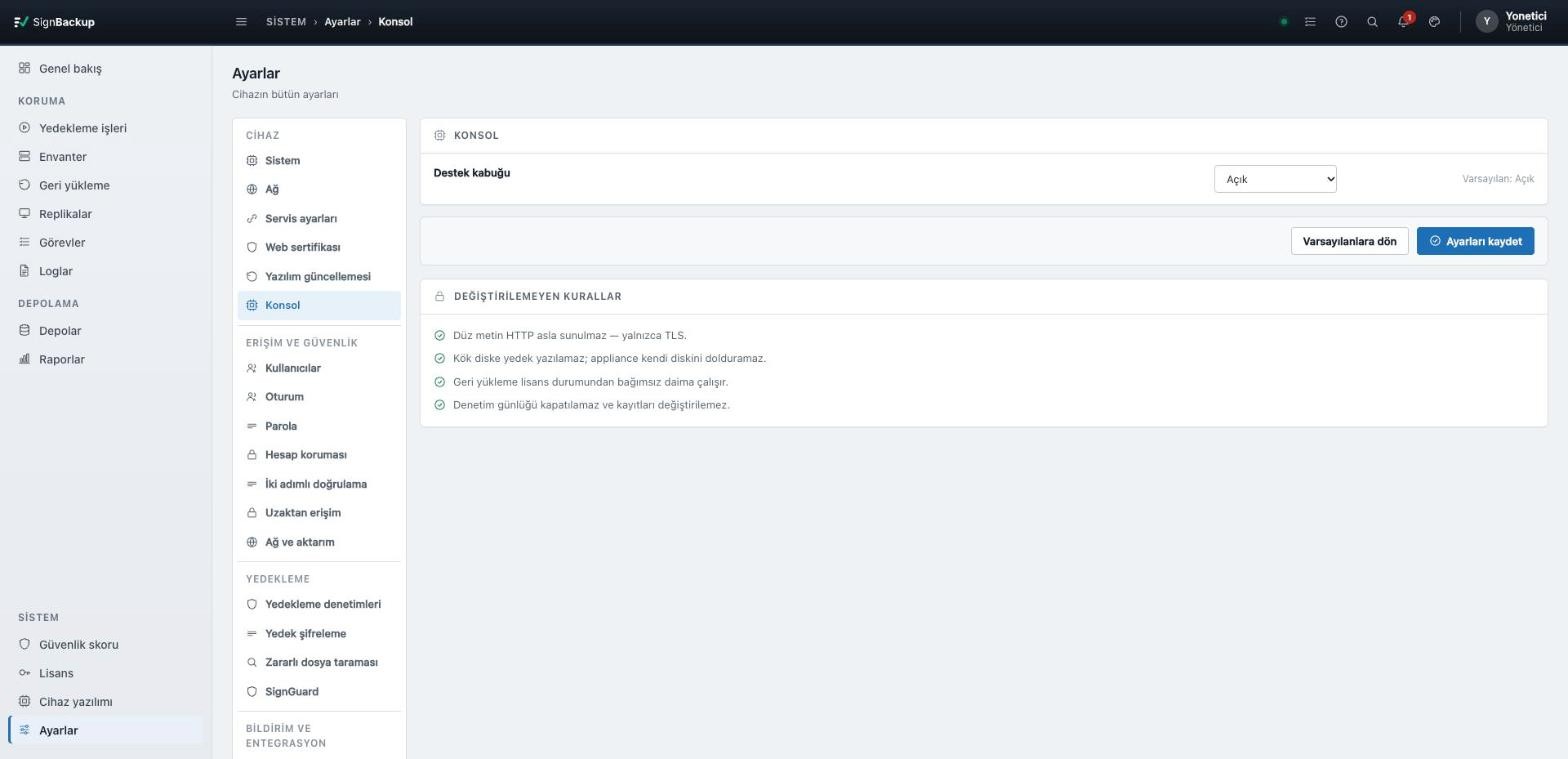
| 9 | Support shell | Shown only if enabled under Settings › Console. The password is asked again; the shell opens with full privileges, every opening is written to the audit log, and the session ends on exit. The lock on immutable backups cannot be removed from this shell either. | Administrator |
| 0 | Exit | Signs out. | Everyone |
Related settings
| Setting | Location | Effect |
|---|---|---|
| Support shell (default On) | Settings › Console | When off, 9) is not shown in the menu. |
| Inactivity timeout (3600 s) | Settings › Session | Limit on time spent in the menu without typing. |
| Allow SSH access / Allowed source networks | Settings › Remote access | Who can reach the SSH menu. |
| Second factor at sign-in | Settings › Two-factor authentication | Code in the SSH menu; not required on the physical console. |
The console menu is a text interface; instead of a screenshot, the options above are reproduced exactly from the code.
Messages and what to do
| Message | Meaning | What to do |
|---|---|---|
| Invalid username or password. | Authentication failed. | Sign in with your web panel credentials. |
| Account temporarily locked. Another administrator can unlock it. | The failed-attempt limit was exceeded. | Wait for the lock to expire, or have another administrator unlock it with 3). |
| This account's password is temporary; set a new password in the web interface first. | The menu does not open with a temporary password. | Sign in on the web and change the password. |
| Two-factor authentication is required on this appliance and your account is not enrolled. | A second factor is required for SSH. | Complete enrollment on the web first. |
| Invalid code. / Wait one minute before requesting a new SMS. | Second-factor code. | Enter the correct code; wait before requesting another SMS. |
| Inactivity timeout reached; session closed. | Session timeout. | Sign in again. |
| Support shell is disabled. / Password could not be verified. | The shell is turned off in settings, or the password is wrong (audit log: "denied"). | Turn it on under Settings › Console; enter the password correctly. |
| A network change is awaiting confirmation. | A trial setting was applied from the web. | Make it permanent with e (yes) or revert with h (no). |
| Invalid selection. | A key that is not in the menu. | Type one of the listed keys. |
Rebooting and shutting down from the web
From the user menu in the top bar, choose Reboot appliance or Shut down appliance (Administrator). The page shows a warning; nothing happens until I understand, continue is ticked. Running jobs are interrupted; interrupted restores appear with the note "interrupted because the service restarted" and can be started again. Every request is written to the audit log.
Frequently asked questions
Can I get a shell over SSH?
Not directly; SSH also opens the menu. A full shell is available only to administrators, through 9) Support shell, if it is enabled in settings.
I lost my phone; how do I sign in as an administrator?
Sign-in on the physical or serial console does not ask for a code; reset your own second-factor enrollment with i), then set it up again on the web.
Does a factory reset delete backups?
No. Backups in the repositories, the repository master key, the appliance ID, the license and the audit log are kept.